

For educational purposes only. This guide shows how to install self-hosted software on your own hardware. I don't condone piracy: only use these apps with media you own or have the right to use, and follow the law where you live. Back up your data first. Full disclaimer
Updated 16 November 2026 Tested with: Agregarr 2.4.2
Agregarr keeps your Plex Home screen fresh by itself. It builds collections from lists like the IMDb Top 250, what’s trending on Trakt, and the Top 10s on Netflix and other services, then updates them every few hours. It can show seasonal rows only when they make sense (Halloween in October, Christmas in December), shuffle the order every morning, and add badges like 4K or the IMDb rating to your posters.
This guide sets up Agregarr with Docker Compose, signs it in to Plex, and makes your first collections. It takes about 20 minutes, and everything after that is clicking, with no config files to learn.
On this page (10 sections)
- 1See what Agregarr does to your Plex Home
- 2What you need to set up Agregarr with Docker Compose
- 3Step 1: Make your compose file
- 4Step 2: Sign in and connect Plex
- 5Step 3: Make your first collection
- 6Step 4: Seasonal rows and a shuffled Home
- 7Step 5: Overlays and Coming Soon
- 8If something’s wrong
- 9Updating Agregarr
- 10Frequently asked questions
See what Agregarr does to your Plex Home
Pick a month and a day to see the seasonal rows come and go, press Shuffle, and switch overlays and Plex Pass on and off. Under the demo is the generator you’ll use in Step 1.
Open the generator full screen
What you need to set up Agregarr with Docker Compose
- A computer or NAS running Docker, and a running Plex server. New to Docker? The Docker install guide covers Windows, Mac and Linux.
- The Plex account that owns the server. Agregarr signs in with it and has no password of its own.
- Optional: Radarr and Sonarr, if you want it to download films and shows from your lists that you don’t have yet.
Step 1: Make your compose file
Fill in Your server in the generator above. Leave Coming Soon placeholders ticked if you’d like films and episodes that aren’t out yet to appear in Plex with a countdown on the poster. It needs two extra empty folders, and the generator adds them for you.
Make a new folder, for example ~/agregarr, save the compose.yaml tab into it, and run the lines from the Commands tab:
sudo mkdir -p /opt/arr/config/agregarr
docker compose up -d
The config folder matters: if it’s wrong, Agregarr forgets everything each time it restarts.
Step 2: Sign in and connect Plex
Open http://your-server-ip:7171. A short setup wizard walks you through four screens.

- Sign in with Plex. Click Sign In and log in with the Plex account that owns your server.
- Configure Plex. Click the refresh button next to the server list, pick your Plex server, and click Continue.
- Configure Sources. IMDb, TMDB, Letterboxd, the Top 10s and AniList work straight away. Trakt, MDBList, MyAnimeList, Tautulli and Overseerr need a key; you can skip them and add them later.
- Configure Downloads. Optional. Add Radarr and Sonarr (or Overseerr) if you want films and shows from your lists that you don’t have yet to be added and downloaded. Skip it if you only want collections of what you already own.
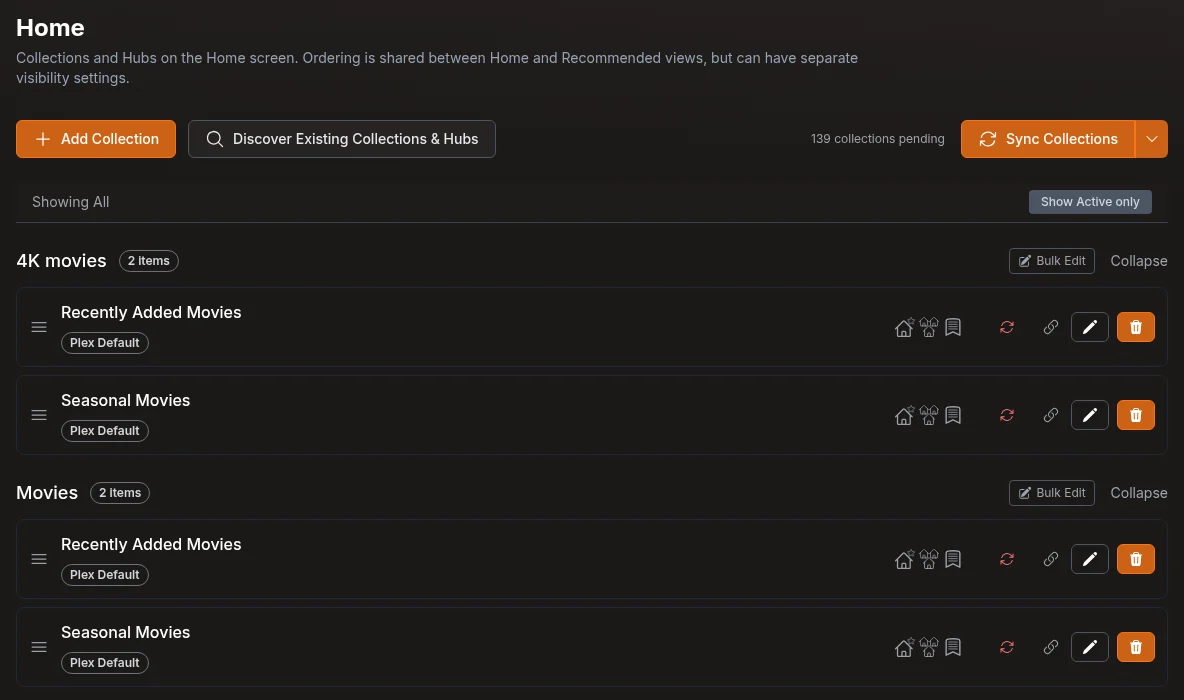
Then click Finish and Discover Existing Collections & Hubs. Agregarr finds the collections you already have and Plex’s own rows (Recently Added, Continue Watching…), so you can arrange them all in one place.
Step 3: Make your first collection
- Click Add Collection.
- Pick a Collection Type, for example IMDb Lists, then a Sub-Type such as Top 250.
- Choose the libraries it goes in, and click Create Collection.
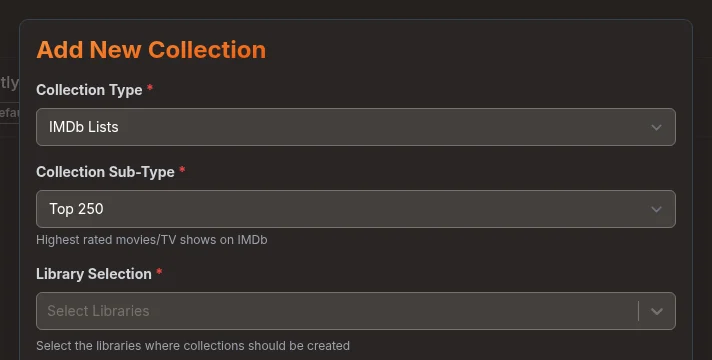
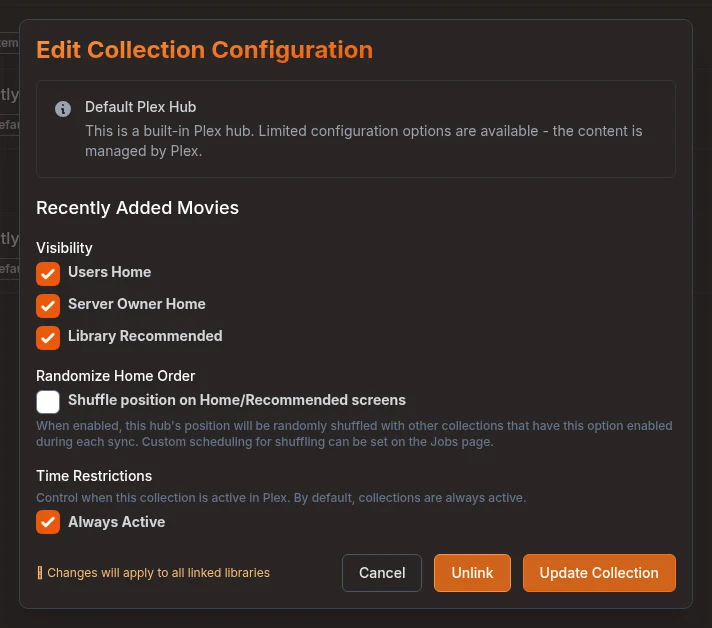
Agregarr fills the collection with the films from that list that are in your library. Click the pencil next to it to choose where it appears:
- Visibility: Users Home (everyone you share with), Server Owner Home (you), and Library Recommended. Tick all three to start with.
- Max Items: how many it shows. If some are missing from your library, it fills up from further down the list.
- Unwatched Only: each person only sees what they haven’t watched yet.
- Posters: Agregarr makes a poster for the collection from a template, or you upload your own.
Finally, click Sync Collections at the top. Until you do, changes sit there as “pending” and nothing reaches Plex. After that, Agregarr syncs by itself every 12 hours, plus a quick update every 30 minutes.
Step 4: Seasonal rows and a shuffled Home
This is where Agregarr shines. In a collection’s settings:
- Time Restrictions: untick Always Active, then add a date range (for example
01-10to31-10for October) or tick days of the week. Outside those times, Agregarr either removes the collection from Plex or just hides it from Home. - Randomize Home Order: tick Shuffle position on the collections you want to move around. Every morning, Agregarr reorders them, so Home looks different each day. You can change when it shuffles on the Settings → Jobs page.
Good ones to start with: Halloween and Christmas lists from Letterboxd or TMDB with date ranges, and a family list on weekends only.
Step 5: Overlays and Coming Soon
Overlays are small badges on top of your posters. Go to Posters → Overlays and choose which ones each library gets. The built-in ones include:
- Quality: 4K, HDR10 and Dolby Vision.
- Ratings: the IMDb rating and Rotten Tomatoes, including Certified Fresh.
- TV: Returning Soon, Returning Tomorrow and the show’s status.
- Coming Soon: a countdown to the release day, and Request Needed or Awaiting Download.
Agregarr redraws them every night, so a countdown always shows the right number of days. It keeps a copy of your original posters, but if you might want plain posters back later, try overlays on one library first.
Coming Soon placeholders need two more small steps (the generator’s Plex + placeholders tab has them with your own paths):
- In Plex, add the two placeholder folders to your Movies and TV libraries (Edit Library → Add folders). Don’t add them to Radarr or Sonarr.
- In Agregarr, go to Settings → Downloads → Placeholder Root Folders and choose
/data/moviesand/data/tv.
Then add a Coming Soon collection. It uses what’s monitored in Radarr and Sonarr, or what’s anticipated on Trakt.
If something’s wrong
- Settings are gone after a restart. The config folder isn’t mounted where you think. Check the
/app/configline in compose.yaml, and that the folder now hasdbandlogsin it. - Collections don’t appear in Plex. Look for “collections pending” next to Sync Collections, and press it. Nothing is sent to Plex until a sync runs.
- They’re in Plex but not on Home. You need Plex Pass for Home and Recommended, and the collection’s Visibility boxes must be ticked. Each person can also hide rows on their own Home in Plex.
- A collection has fewer items than the list. It only shows what’s in your library. Turn on downloads in Step 2 if you want the rest fetched, or raise Max Items so it fills from further down.
- Lots of “IMDb … 403” errors in the log at night. A known Agregarr issue (#626): it checks the IMDb Top 250 for every item and IMDb starts refusing. Ratings still come through, so it’s only log noise.
- The Coming Soon collection is empty. Check both placeholder steps above. The folders must be in Plex, and set in Agregarr’s Downloads settings.
- A placeholder is still in Plex after you deleted its folder. Plex won’t remove anything from a library folder that’s completely empty, in case a disk has dropped off. It goes once the folder has something in it again.
Updating Agregarr
cd ~/agregarr
docker compose pull && docker compose up -d
Your collections and settings are kept, because they live in the config folder, not in the container.
Frequently asked questions
Do I need Plex Pass for Agregarr?
Only to show collections on the Home and Recommended screens. Without Plex Pass, Agregarr still makes collections, posters and overlays, but collections only appear in each library's Collections tab.
Is Agregarr better than Kometa?
It is easier: everything is point-and-click in a web page. Kometa can do more but is set up with YAML files. Use one or the other on a library, not both.
Why are my Agregarr collections not in Plex?
Changes wait as pending until a sync runs. Press Sync Collections; after that Agregarr syncs every 12 hours by itself.
What are Coming Soon placeholders?
Small stand-in files that make films and shows that are not out yet appear in Plex with a countdown poster. Keep them in their own folders, added to Plex but not to Radarr or Sonarr.
Thank you
Agregarr is free and open source (GPL-3.0), made by the team at agregarr.org. It started from Overseerr and was inspired by Kometa. The posters in the demo are made up. This site isn’t connected to Agregarr, Plex or any of the list sites.
Related guides: Radarr · Sonarr · Cantinarr · Media Server Stack
If this guide helped you, consider buying me a coffee. It helps keep guides like this one coming.
Get new guides by email
About one email a month: new step-by-step guides and card releases. No spam, unsubscribe any time.