
For educational purposes only. This guide shows how to install self-hosted software on your own hardware. I don't condone piracy: only use these apps with media you own or have the right to use, and follow the law where you live. Back up your data first. Full disclaimer
Updated 16 November 2026
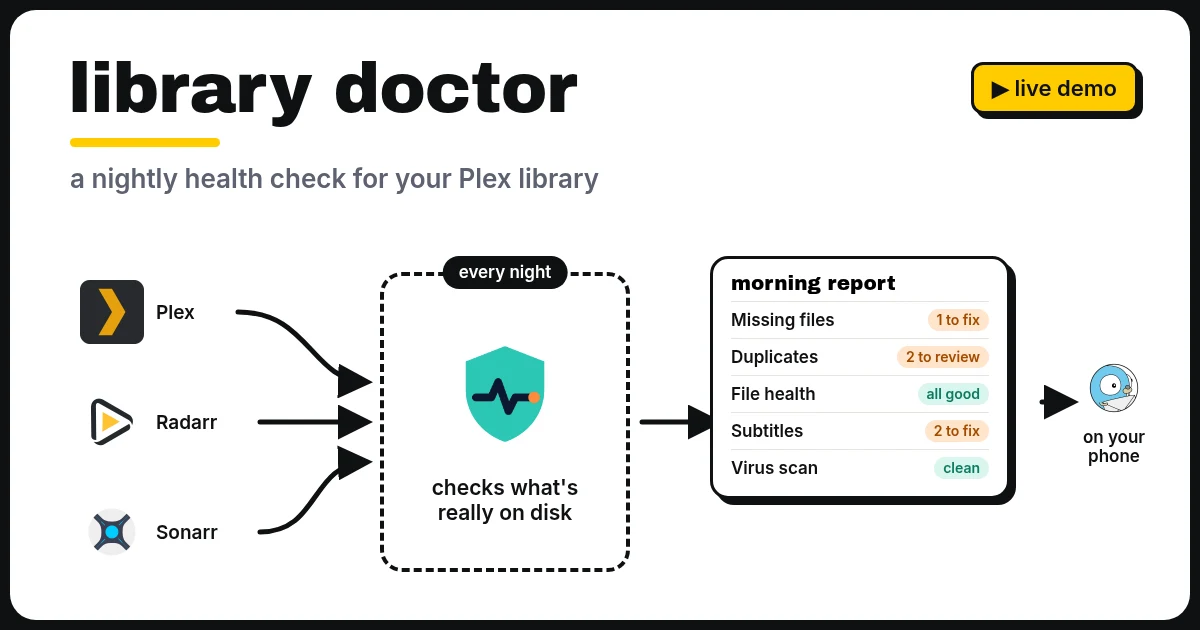
Library Doctor is a small, free app I built for Plex. Every night it checks your Plex library against what’s really on the disk and what Radarr, Sonarr and your other apps think is there. In the morning you get one page that shows what needs fixing, with a button to fix most of it.
It’s a Plex library health check and clean-up tool in one: missing files, duplicates, broken files, bad subtitles, fake downloads and space hogs, all on one screen. Nothing is deleted without asking.
On this page (8 sections)
Watch: install Library Doctor with Docker Compose
The video has subtitles at the bottom and no sound. It was recorded on a clean test install of Library Doctor 0.1.10 with a test Plex and Radarr. The scan result is real: two copies of Big Buck Bunny © Blender Foundation, peach.blender.org, licensed under Creative Commons Attribution 3.0.
Try the demo
This is the real Library Doctor page with a made-up library loaded into it. Click the tiles, clean up a duplicate, replace a broken file, import a stuck download, look at the History panel and Settings, then open the Trash. Every button works, but nothing real is changed.
What it checks
- Missing files: Plex, Radarr or Sonarr list a file that isn’t on the disk any more. Season gaps lists episodes Sonarr wants but never got (“Season 2: episodes 6–10”), with a button to search for them again.
- Duplicates: two copies of the same film or episode. It says which copy to keep and why: higher resolution, longer, a better file type, or the one Radarr or Sonarr tracks. Different editions, like a theatrical cut and a director’s cut, are never counted as duplicates, and each copy shows its edition. Neither are two different films with the same title, like The Fly from 1958 and 1986. A copy that’s hardlinked to a torrent that’s still seeding is marked, because removing it frees no space.
- Metadata gaps: episodes called “Episode 5” when Sonarr knows the real title, blank season posters, wrong years, and things that aren’t in Radarr or Sonarr at all.
- File health: files that are broken, much shorter than they should be, or dubbed (an English film whose only audio is Russian). Replace moves the bad file to the trash and asks Radarr or Sonarr for a new copy, checks every hour until it arrives, and then checks the new copy too. New downloads are checked within 10 minutes of arriving, so you hear about a bad one straight away.
- Subtitles: subtitle files that are only adverts, ones whose name no longer matches the video (so Plex can’t find them), and what Bazarr is still looking for.
- Virus scan: programs pretending to be films (like
film.mkv.exe), and a ClamAV check of every new file. - Quality & space: files far bigger than usual for their length, old
.tsfiles (Convert to MKV fixes them in seconds without re-encoding), and episodes much worse than the rest of their season. If Sonarr or Radarr isn’t monitoring those episodes, it will never upgrade them on its own, so a Monitor button switches that on for just those episodes. After Search for better copies it follows the search up: downloading, imported (with the quality), or nothing found. For a film that’s far too big, Find a smaller copy asks Radarr for a release of the same quality at least a quarter smaller. The old file waits in Radarr’s recycle bin for seven days. Files that aren’t HEVC yet get a Convert with Tdarr button, and a Files Tdarr never saw list catches anything Tdarr’s folder watching missed. If Tdarr fails on a file, a card says why in plain English (for example “a subtitle track ffmpeg can’t copy”) with a Retry button. If one release group keeps supplying files that have to be replaced, it offers to block that group in Radarr and Sonarr. - Downloads: problems in the Radarr and Sonarr queues. A finished download they won’t import by themselves gets an Import button. A stuck download says why, straight from your download client (qBittorrent, Transmission, SABnzbd or NZBGet): nobody is sharing it, the tracker no longer has it, or it’s just slow. Torrents get Re-announce, and Remove & try another blocklists the release and searches for a different one.
- Unwatched: what nobody has played in a year, biggest first, using Tautulli. It never deletes anything, it just shows where the space is.
- App Health: each app’s own warnings in one place (Radarr, Sonarr, Prowlarr, Bazarr, Tdarr), apps that stop answering, updates with the commands to copy, and indexers that keep failing and never find anything.
Nothing is deleted without asking
This was the most important part for me. Every clean-up moves files into Library Doctor’s own trash, on the same disk, so it’s instant. You can put anything back for seven days, then the trash empties itself. The Trash screen also lists what’s waiting in Radarr’s and Sonarr’s own recycle bins (old copies they replaced) and qbit_manage’s, with when each bin next empties, so “where did that file go?” has one answer.
- Each suggestion is marked Sure (a tiny broken copy, a leftover temp file) or Check (two good copies, have a look first).
- Keep this one instead lets you overrule its choice.
- Review one by one goes through the duplicates one at a time.
- After each fix, it checks Plex to make sure the right copy is left. The result shows under Done.
What it connects to
Plex, Radarr, Sonarr, Bazarr, Tautulli, Agregarr, Tdarr, ClamAV, Prowlarr, the download clients qBittorrent, Transmission, SABnzbd and NZBGet, and Gotify for messages. Only Plex, Radarr and Sonarr are needed; each of the others switches on its own checks. It only reads from them until you press a button. Then it asks the right app to do the job, so Radarr deletes and downloads films, Tdarr converts them and Plex rescans its own folders.
Every night
It scans at 3am (you pick the time and the days in Settings). If something new turned up, a broken file was replaced, or the trash is about to empty, you get one Gotify message on your phone. If you don’t use Gotify, it can send the same message to Discord, Telegram, ntfy, any webhook, Pushover or email instead. If nothing changed, it stays quiet, and if you’d rather have one quiet summary a week, that’s a setting too.
A History panel shows the last 30 or 90 days: how much space it has saved, how many issues each scan found and how long the scans took. A Disk space panel shows how much room is left and, after a week of readings, roughly when the disk will be full.
A full scan of about 7,500 films and episodes takes around 25 seconds.
What’s new and what’s coming
Done ✓ v0.1.10 (16 November)
- Your library score and how it changed now come with the nightly and weekly messages
- Unraid template has the new settings; a Dismiss button on security warnings
Done ✓ v0.1.9
- Analysis tab: a library score out of 100 for file integrity, quality, metadata, duplicates and app sync, trends over time, storage recovered, problems that keep coming back, and storage and quality per library
- Best fix, risk and space saved spelled out on every card
- Incomplete folder clean-up: finds half-finished downloads no download client is using any more
- Safer behind a reverse proxy, and settings backups with the API keys encrypted
Done ✓ v0.1.8
- A closer look before deleting: nothing leaves the trash for good if the copy that was kept is gone, a replacement hasn’t arrived yet, or it would be the only copy
- Security hardening, and Library Doctor is now in Unraid’s Community Apps
Earlier
- v0.1.7: folder check, download clients (qBittorrent, Transmission, SABnzbd, NZBGet), checks on import, hardlink aware, custom format scores, settings backup
- v0.1.6: wrong audio language, season gaps, disk space forecast, app update buttons
- v0.1.5: App Health, a warning before the trash empties, Plex backup reminder, Plex tidy-up, light mode, “Review all fixes”
Next
- Jellyfin and Emby support, being tested on a second server first
Being considered (tell me if you’d use these)
- Music libraries (missing artwork, duplicate tracks, fake bitrates)
- A Home Assistant card
Got an idea, or want to test one of these early? Open an issue on GitHub or reply to the newsletter.
Can I get it?
Join the newsletter to hear about new versions, and reply to tell me which checks you’d like added.
Get new guides by email
About one email a month: new step-by-step guides and card releases. No spam, unsubscribe any time.
Frequently asked questions
Can I download Library Doctor?
Yes. It's a free beta Docker app on GitHub (github.com/spikey1965/library-doctor), with a Docker Compose file and install steps. It needs Plex, Radarr and Sonarr; the other apps are optional.
Does Library Doctor delete files?
Only when you press a button, and even then it moves them into its own trash first. You can put anything back for seven days.
Which apps does it work with?
Plex, Radarr, Sonarr, Bazarr, Tautulli, Agregarr, Tdarr, ClamAV and Gotify. It only reads from them until you choose a fix.
How long does a scan take?
On my server, about 25 seconds for around 7,500 films and episodes. It runs every night at 3am by itself.
Thank you
Library Doctor stands on the shoulders of the apps it talks to: Plex, the Radarr and Sonarr teams, Bazarr, Tautulli, Agregarr, Tdarr, ClamAV, Gotify and ffmpeg. The titles in the demo are made up. This site isn’t connected to any of those projects.
Related guides: Media Server Stack Explained · Tdarr · Bazarr · Agregarr · Gotify