

Sonarr does for TV shows exactly what Radarr does for movies. Add a series, set a quality profile, and Sonarr monitors air dates, searches your indexers when a new episode drops, grabs it, imports it into your library, and pings Plex or Jellyfin to scan. You never have to manually search for an episode again.
NZB + torrent indexers · Port 9696
Torrent download client · Port 8080
NZB downloads · Port 8085
- Series / season monitor
- Episode wanted list
- Air date tracking
- Quality profiles per show
- Rename & organise files
Watches
/tv folder · Auto-detects episodesZFS dataset on TrueNAS
On episode grab/import · Webhook support
What you need before you start
- Prowlarr running with at least one indexer configured
- A download client — qBittorrent (via Gluetun) or SABnzbd
- A TV dataset on your pool — e.g.
/mnt/tank/media/tv - The same
/downloadspath mounted in both Sonarr and your download client
Docker Compose
Create /mnt/tank/stacks/sonarr/docker-compose.yml:
services:
  sonarr:
    image: lscr.io/linuxserver/sonarr:latest
    container_name: sonarr
    environment:
      - PUID=568
      - PGID=568
      - TZ=Europe/London
    volumes:
      - /mnt/tank/configs/sonarr:/config
      - /mnt/tank/media/tv:/tv
      - /mnt/tank/downloads:/downloads
    ports:
      - 8989:8989
    restart: unless-stopped
cd /mnt/tank/stacks/sonarr
docker compose up -d
docker compose logs -f sonarrSonarr will be available at http://<your-nas-ip>:8989.
First-time setup
1 — Media management
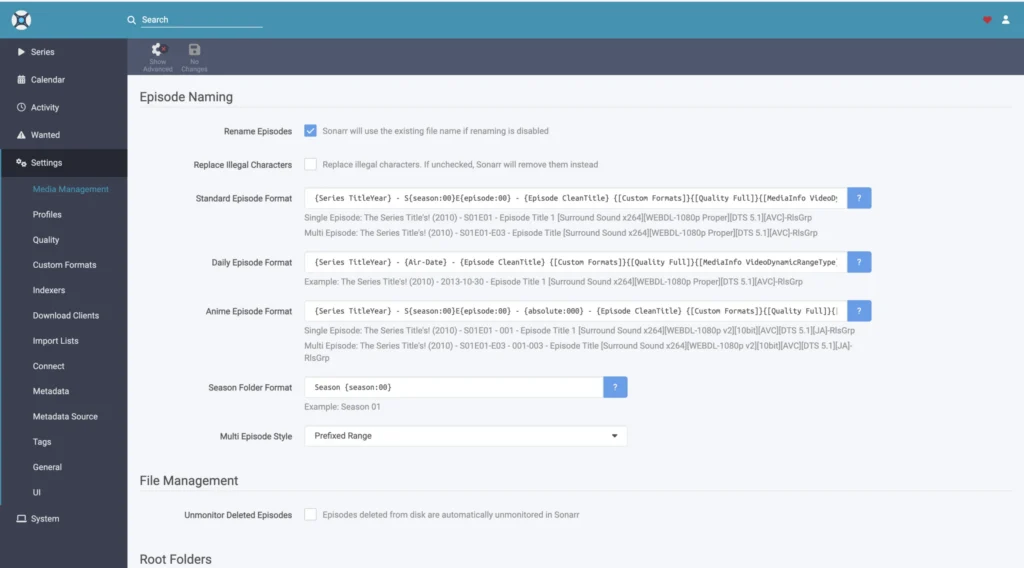
Go to Settings → Media Management and add /tv as a root folder. Enable Rename Episodes and Use Hardlinks.
A good episode naming format to use:
{Series Title}/Season {season:00}/{Series Title} - S{season:00}E{episode:00} - {Episode Title}Daily Episode Format:
{Series TitleYear} - {Air-Date} - {Episode CleanTitle} {[Custom Formats]}{[Quality Full]}{[MediaInfo VideoDynamicRangeType]}{[Mediainfo AudioCodec]}{[Mediainfo AudioChannels]}{[MediaInfo VideoCodec]}{-Release Group}Season Folder Format:
Season {season:00}2 — Add your download client
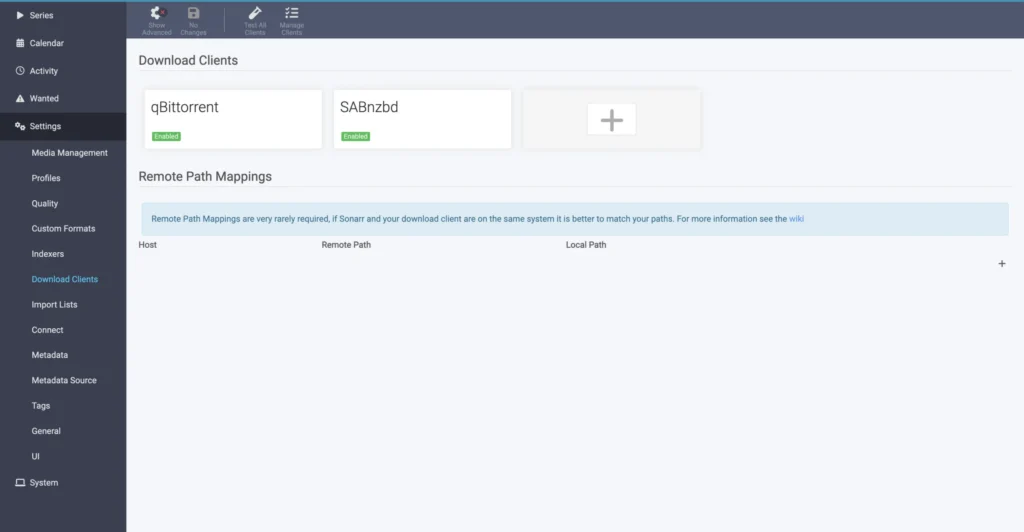
Settings → Download Clients → +. Same settings as Radarr — host, port, credentials — but set the category to sonarr so downloads don’t mix.
3 — Connect Prowlarr
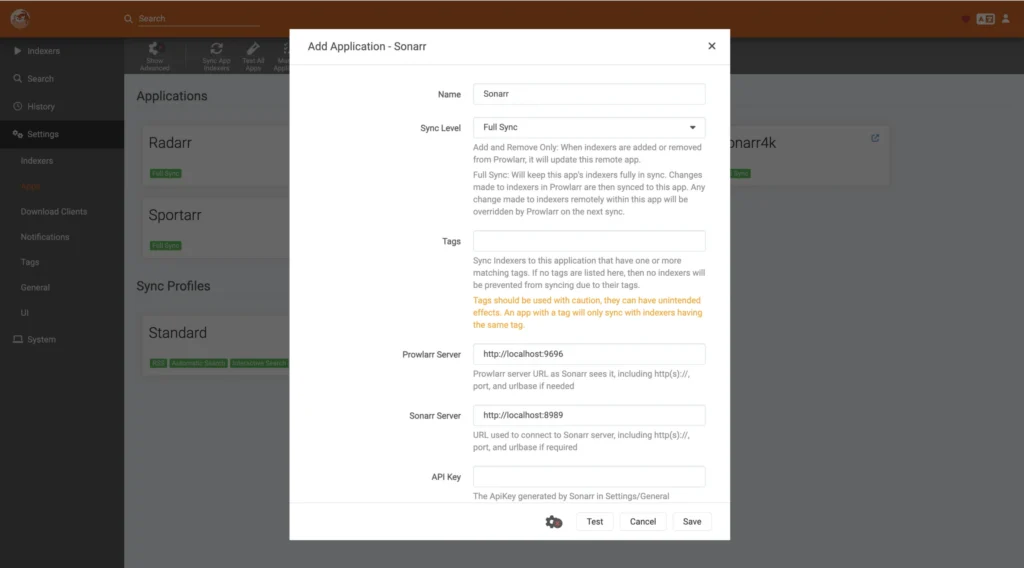
In Prowlarr go to Settings → Apps → + and add Sonarr. All your indexers will sync across automatically.
4 — Quality profiles
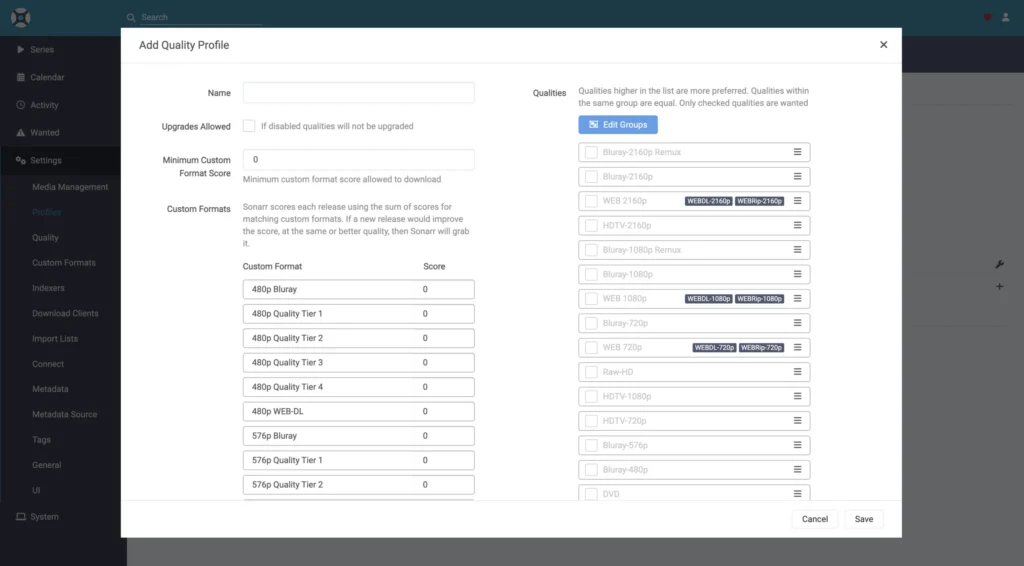
Go to Settings → Profiles and create or edit a quality profile for your TV downloads — set which resolutions/sources are allowed and in what order of preference, so Sonarr always grabs the best available release without upgrading endlessly.
5 — Add a series
Series → Add New, search for the show, choose your quality profile and whether you want all seasons or just future episodes, then click Add Series.
Monitor options: “All Episodes” grabs everything from every season. “Future Episodes” only grabs new episodes going forward. “Missing Episodes” fills in gaps you’re missing without re-downloading things you already have.
How season packs work
When a full season pack is released, Sonarr is smart enough to grab the pack rather than individual episodes — it compares what you have against what’s in the pack and upgrades accordingly. It will also upgrade individual episode files if a better quality release appears later, depending on your quality profile settings.
Useful commands
# View recent activity
docker compose logs --tail 50 sonarr

# Check what Sonarr is importing right now
docker exec sonarr cat /config/logs/sonarr.txt | grep -i import | tail -20

# Restart
docker compose restart sonarr
Common problems
| Problem | Likely cause |
|---|---|
| Episode grabbed but not imported | /downloads path mismatch between Sonarr and download client |
| Wrong episode matched | Series has duplicate entries in TVDB — check the TVDB ID in series settings |
| Hardlinks not working | /tv and /downloads must be on the same ZFS dataset |
| No results for a show | Indexers not synced from Prowlarr, or show uses a different name on the tracker |
| Permissions denied | PUID/PGID should be 568:568 to match TrueNAS apps group |