

Before Prowlarr, you had to add every indexer separately in Radarr, Sonarr, Lidarr and anything else in your stack. Change a password or an API key and you were updating it in five places. Prowlarr sits in the middle — you configure all your indexers once, and it syncs them to every arr app automatically.
- Torrent + Usenet indexers
- Public & private trackers
- Search proxy for arr apps
- Auto-sync to all apps
- Port: 9696
What you need before you start
- At least one arr app to sync to — Radarr or Sonarr already running
- Indexer credentials — API keys for private trackers, or just a URL for public ones
- Optional: a FlareSolverr container if you use Cloudflare-protected indexers
Docker Compose
Create /mnt/tank/stacks/prowlarr/docker-compose.yml:
services:
  prowlarr:
    image: lscr.io/linuxserver/prowlarr:latest
    container_name: prowlarr
    environment:
      - PUID=568
      - PGID=568
      - TZ=Europe/London
    volumes:
      - /mnt/tank/configs/prowlarr:/config
    ports:
      - 9696:9696
    restart: unless-stopped
Running behind Gluetun? If you want Prowlarr’s search traffic to go through the VPN, swap
ports:fornetwork_mode: "container:gluetun"and add the port to Gluetun instead. Most people don’t bother — Prowlarr only talks to indexer APIs, not BitTorrent peers.
cd /mnt/tank/stacks/prowlarr
docker compose up -d
Prowlarr will be at http://<your-nas-ip>:9696.
First-time setup
1 — Add your arr apps
Go to Settings → Apps → + and add each arr app:
| App | URL | Where to get the API key |
|---|---|---|
| Radarr | http://radarr:7878 | Radarr → Settings → General → API Key |
| Sonarr | http://sonarr:8989 | Sonarr → Settings → General → API Key |
| Lidarr | http://lidarr:8686 | Lidarr → Settings → General → API Key |
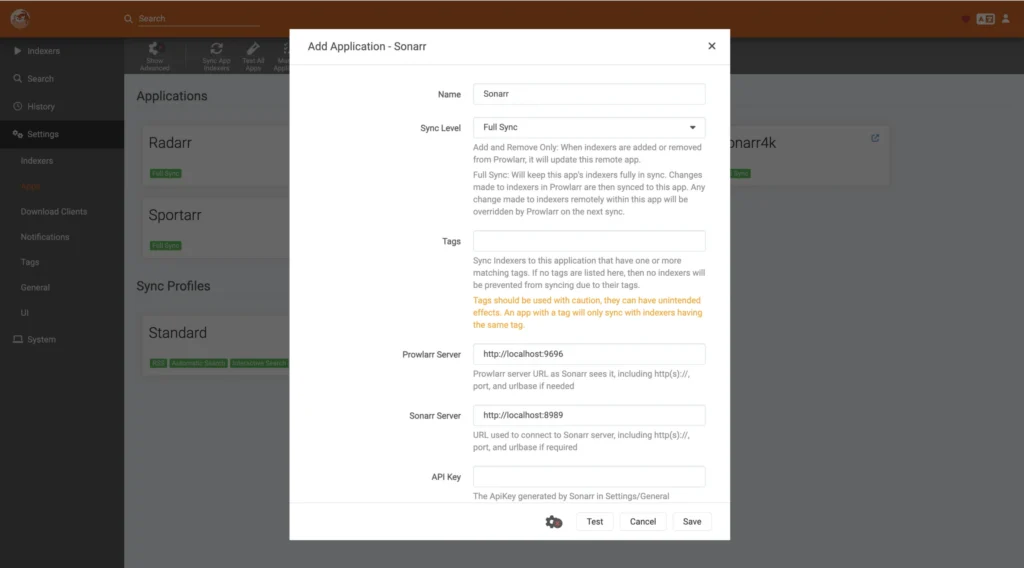
Once an app is added, every indexer you configure in Prowlarr will be pushed to it automatically. You never touch indexer settings inside Radarr or Sonarr again.
2 — Add indexers
Indexers → Add Indexer → +. Search for your tracker by name. Prowlarr has built-in support for hundreds of public and private trackers, plus any Newznab or Torznab-compatible Usenet indexer.
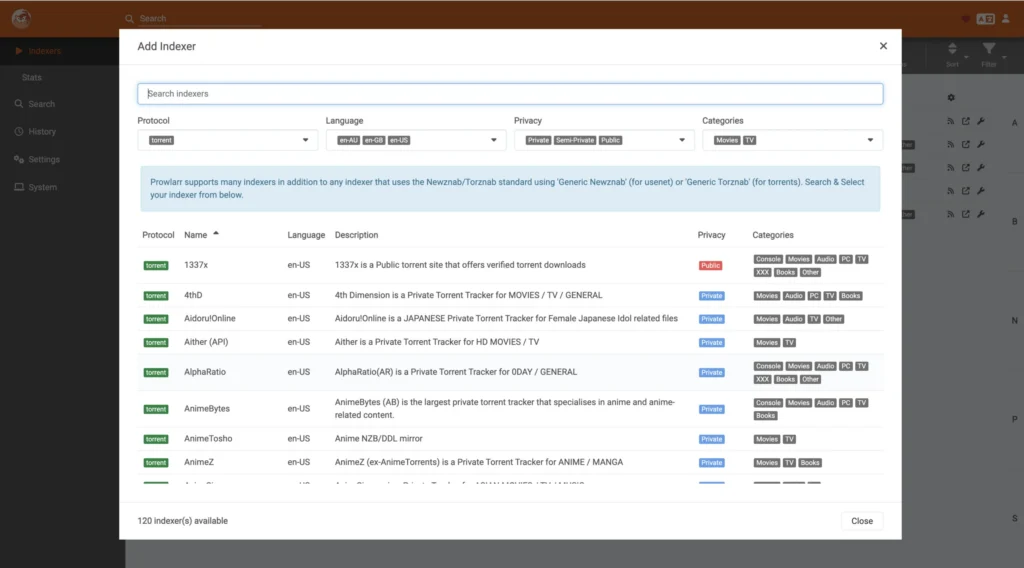
For private trackers you’ll typically need:
- Your tracker username and password, or an API key
- Sometimes a passkey from your tracker profile
For Usenet you need your provider’s Newznab API URL and API key (from your account page on NZBGeek, NZBFinder, etc.).
3 — Test and sync
After adding an indexer, click Test to confirm it connects, then Save. Prowlarr will automatically push it to all connected apps within a few seconds. Check in Radarr under Settings → Indexers to confirm it appeared.
Indexer categories
Each indexer in Prowlarr has categories — these map to what the arr apps request. Make sure your indexer has the right categories ticked:
| Category | Used by |
|---|---|
| Movies (2000) | Radarr |
| TV (5000) | Sonarr |
| Audio (3000) | Lidarr |
| Books (7000) | Readarr |
FlareSolverr (optional)
Some public indexers sit behind Cloudflare’s bot protection and block automated requests. FlareSolverr is a headless browser that solves these challenges so Prowlarr can get through.
  flaresolverr:
    image: ghcr.io/flaresolverr/flaresolverr:latest
    container_name: flaresolverr
    environment:
      - LOG_LEVEL=info
    ports:
      - 8191:8191
    restart: unless-stopped
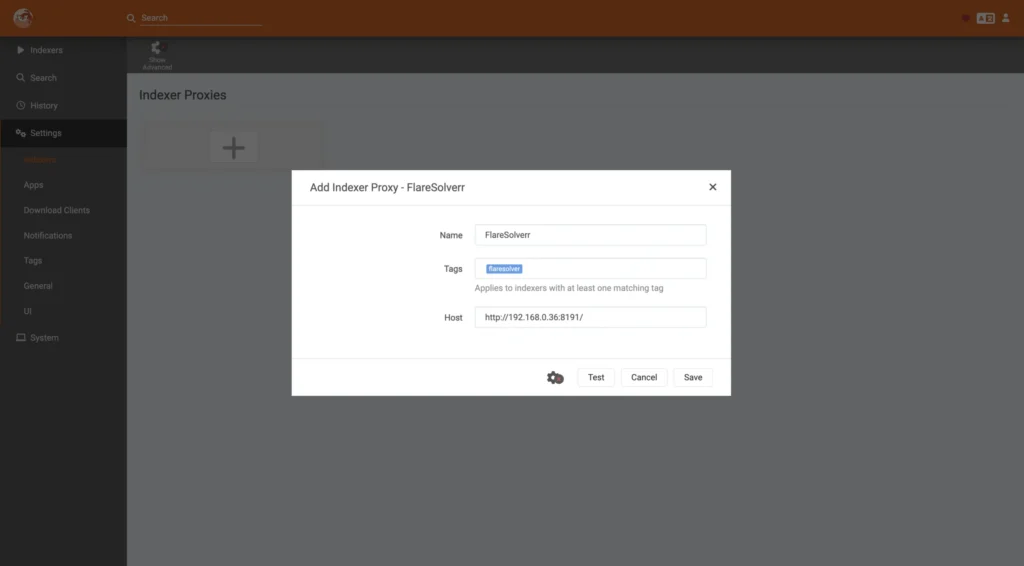
Then in Prowlarr: Settings → Indexers → Add Proxy, select FlareSolverr, set the URL to http://flaresolverr:8191. Then on any indexer that needs it, set the proxy to FlareSolverr.
Useful commands
# Check logs
docker compose logs --tail 50 prowlarr

# Force a sync to all apps
# Settings → Apps → select app → Sync App Indexers

# Check indexer status
# Indexers → any indexer → small graph icon shows query history
Common problems
| Problem | Likely cause |
|---|---|
| Indexer not syncing to Radarr | Wrong API key in the app connection, or app unreachable |
| Cloudflare block on public trackers | Add FlareSolverr and assign it to that indexer |
| Indexer always failing health check | Check the indexer URL — many trackers change domains |
| No results for a search | Categories not ticked — make sure Movies/TV are selected |