
Use this at your own risk, and test it before relying on it, especially anything that controls a real device. Full disclaimer
Updated 15 November 2026
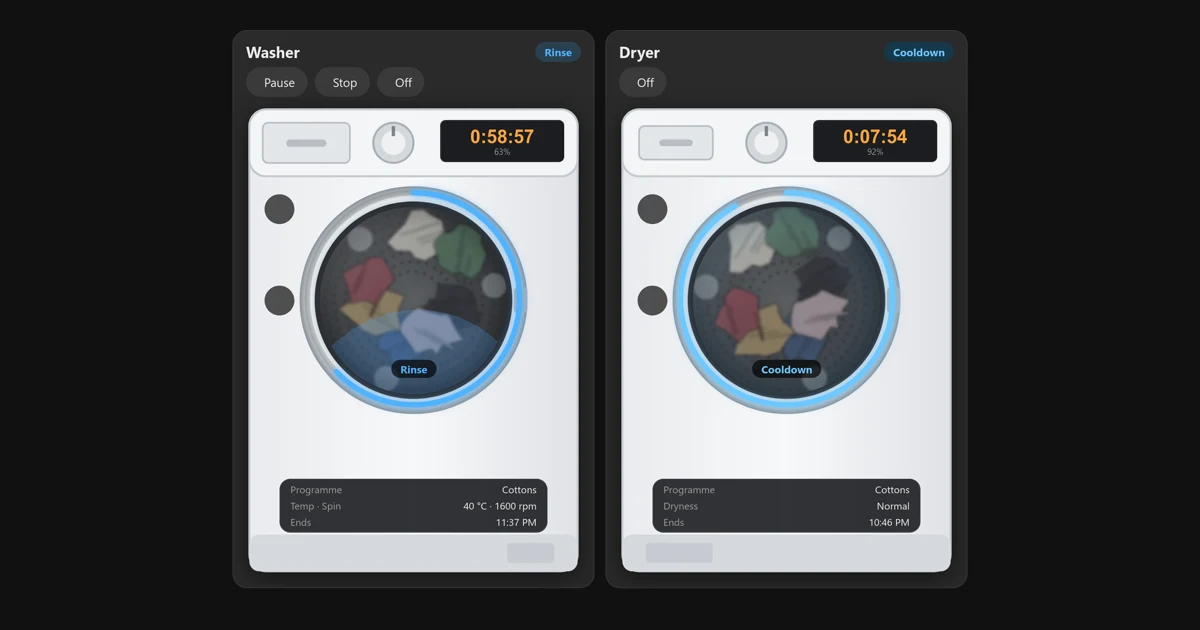
Got a Miele washer or tumble dryer in Home Assistant? This is my washer and dryer card made just for Miele machines, a sister card of the hOn washer and dryer card. It shows the time left on the machine’s display, a progress ring round the door and the laundry turning in the drum. It also has buttons to start, pause or stop the wash from your phone.
It works with the official Miele integration that’s built into Home Assistant, in any language. The card itself speaks English and German: it switches to German by itself when your Home Assistant is set to German.
Tested on a real Miele washer
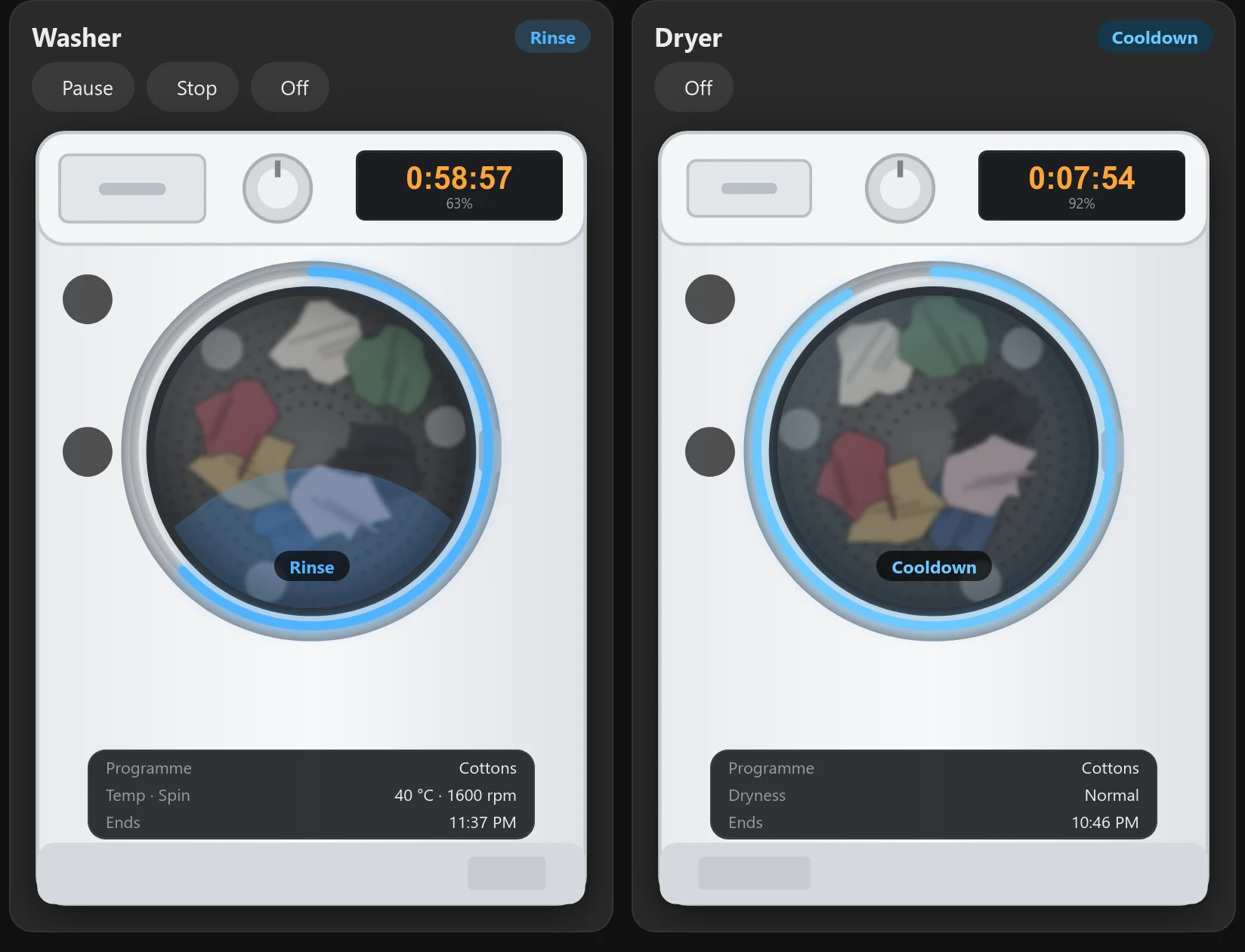
I don’t own a Miele. I built the card from a Home Assistant user’s detailed list of their washer’s entities and from the Miele integration’s source code, and it now runs on their real Miele washer (thanks MrMoep): phase, programme, temperature, spin, end time, the countdown, the door and the Stop and Off buttons all work. The dryer side has only been tested against simulated machines so far.
If you have a Miele dryer, please try it and tell me how it goes: open an issue on GitHub.
Version 1.0.0 (15 November 2026): out of beta. Since the first test version it has gained German, a Door line in the info panel, the end time in Home Assistant’s own 12/24-hour format, and a fix for a faint circle in the photo style.
On this page (7 sections)
What the Miele washer and dryer card shows
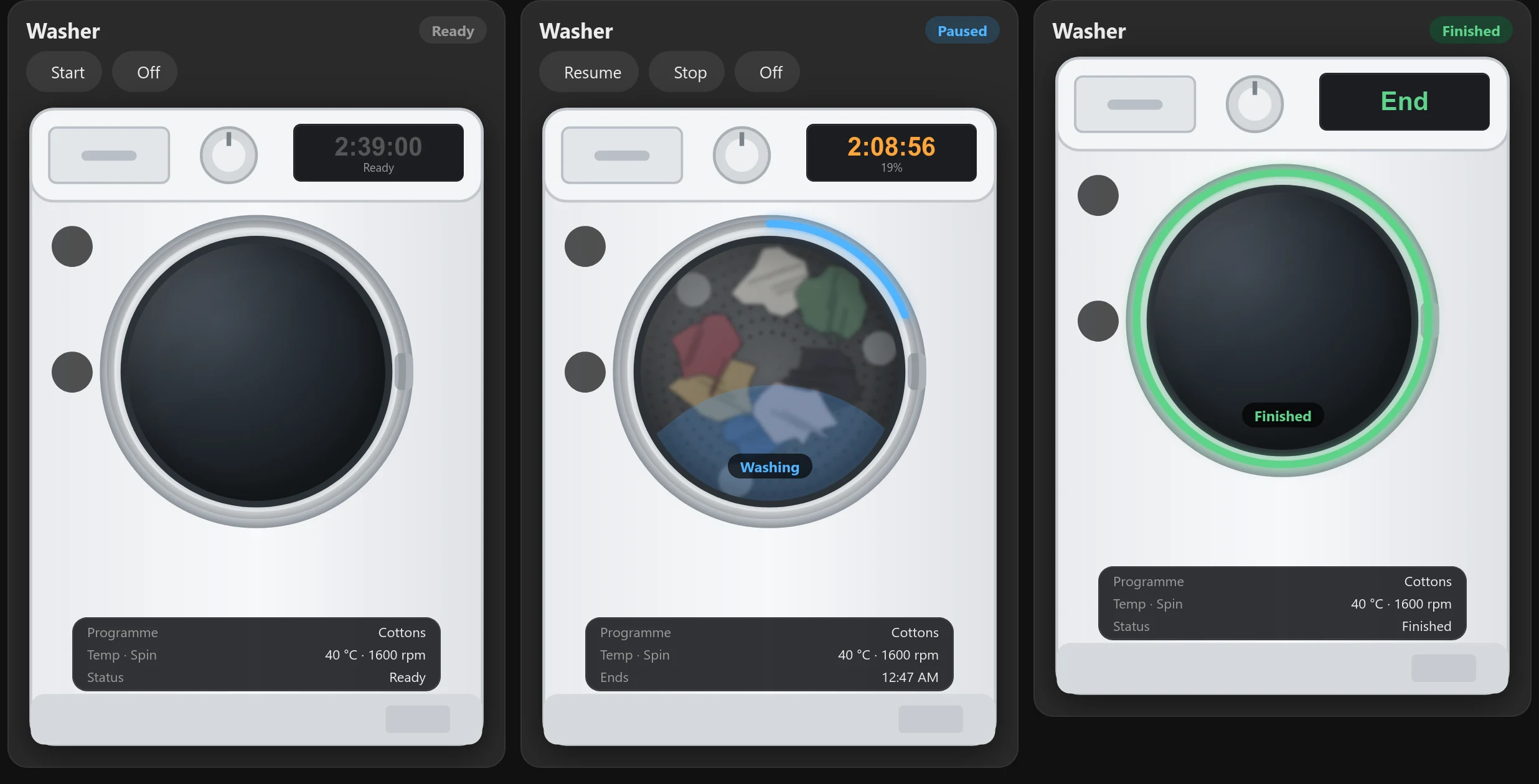
- The machine’s status: Off, Ready, Delayed start, the current phase while it runs, Paused, Finished and Error.
- The wash phase on the glass: Washing, Rinse, Draining, Spin, Anti-crease, Drying, Cooldown and so on.
- The time left on the machine’s own display, counting down every second, with the percentage done. Before you start, it shows how long the selected programme takes.
- A progress ring round the door that fills as the cycle runs and turns green when it’s finished.
- The programme, the temperature and spin speed on a washer, the dryness level on a dryer, and the time it will finish (in Home Assistant’s own 12- or 24-hour format).
- The door: Open, Closed or Locked in the info panel, with the door icon turning amber when it’s open. Plus a Remote Control icon.
- English or German, picked from your Home Assistant language. Programme names come from Home Assistant’s own translation, so they match what you see in HA.
- Start, Pause, Resume, Stop and Off buttons. They only appear when the machine will accept them, so there’s no Pause button during a delayed start. Stop and Off ask first. On some Miele machines Pause never appears, because Miele’s integration doesn’t offer it while the machine runs.
Before you start
- Your Miele washer or dryer added to Home Assistant with the built-in Miele integration (Settings → Devices & services → Add integration → Miele). This is the official integration, not the older community one.
- Remote Control switched on at the machine if you want the buttons. Without it, the card still shows everything.
Step 1: Install it from Marketplace (formerly HACS)
⚡Open in Marketplace (one click)


The button opens Marketplace in your own Home Assistant with the card filled in. If asked, connect GitHub and click Add, then click Install. The first time, it asks for your Home Assistant’s address. Or do it by hand:
- In Home Assistant, open Settings → Marketplace and click Add from link. This asks you to connect GitHub.
- Paste
https://github.com/spikey1965/ha-miele-appliance-card, choose the type Dashboard if asked and click Add. - Find Miele Appliance Card under New, open it and click Install.
- Refresh the browser.
The first time you use Marketplace, tick I understand the risks and agree and click Continue. On a version older than 2026.11? Marketplace is still called HACS there (what changed in 2026.11). The same steps work, with Download in place of Install and ⋮ → Custom repositories in place of Add from link.
⬇Get the Miele card on GitHub (free)
Without Marketplace: download miele-appliance-card.js from the latest release and save it as config/www/miele-appliance-card.js. Then go to Settings → Dashboards → ⋮ menu → Resources (turn on Advanced mode in your user profile if you can’t see Resources), click Add resource, enter /local/miele-appliance-card.js?v=1.0.0, choose JavaScript module and refresh the browser.
It’s MIT licensed and free. It can sit alongside the hOn washer card, because the two use different card names.
Tried the earlier test version? If you added /local/hon-appliance-card-beta.js from this page before, remove that resource and change your card to type: custom:miele-appliance-card as below. You can delete the old file from config/www too.
Step 2: Add the card
Add a Manual card to your dashboard and paste this:
type: custom:miele-appliance-card
appliance: washer
For a dryer, change washer to dryer. The card uses a plain drawing of a front loader by default. Add style: photo for a more detailed illustration.
The card finds your machine by itself. The Miele integration names its entities in Home Assistant’s language (in German they look like sensor.waschmaschine_programmphase), so the card finds them through the integration instead of by name. If you have more than one Miele washer, add entity: with the machine’s status sensor, the one with no ending, such as sensor.washing_machine.
You can also set name, colour, max_width, finish (white, graphite or black) and language (auto, en or de; auto follows Home Assistant). The README on GitHub lists them all.
What it can’t do (yet)
- Pick a programme from the card. The Miele integration needs a programme number to start one, and it doesn’t tell Home Assistant which numbers your machine has. So choose the programme on the machine, switch on Remote Control, and press Start on the card.
- No cycle count, because the integration doesn’t have one.
Help test it
Have a Miele dryer? A screenshot of the card while it’s drying would help most, because the washer has been tested on a real machine but the dryer hasn’t yet. Anything that looks wrong is useful too, on either machine. Open an issue on GitHub.
Frequently asked questions
Which integration does the Miele card need?
The official Miele integration built into Home Assistant, not the older community one.
Can I start a Miele programme from the card?
Not pick one. The Miele integration doesn't tell Home Assistant which programme numbers your machine has. Choose the programme on the machine, switch on Remote Control, and press Start on the card.
Does the card work without Remote Control?
Yes. It still shows everything. Remote Control is only needed for the buttons.
Is the Miele card finished?
Yes, version 1.0.0 is out of beta. It's been tested on a real Miele washer. The dryer side has only been tested on simulated machines, so screenshots from a real Miele dryer help a lot.
Thank you
Thanks to MrMoep on GitHub, whose detailed write-up of the Miele entities made this possible, and who then tested the card on their own Miele washer, sent screenshots and checked the German wording.
More cards in beta: GE washer and dryer (SmartHQ) · Candy, Haier and Hoover (Simply-Fi) · Frigate Timeline (CCTV) · Kid Watch (parental controls) · all betas
If you like the card, consider buying me a coffee. It helps keep projects like this one free.
More free Home Assistant cards
All free, with a live demo and step-by-step setup.
Want one made for your home? See custom cards and dashboards.
Get new guides by email
About one email a month: new step-by-step guides and card releases. No spam, unsubscribe any time.
 spikey1965