
For educational purposes only. This guide shows how to install self-hosted software on your own hardware. I don't condone piracy: only use these apps with media you own or have the right to use, and follow the law where you live. Back up your data first. Full disclaimer
Updated 16 November 2026 Tested with: SABnzbd 5.2.0 Beta 2
SABnzbd 5.2 is out as a beta, and it’s a big one. You can now search your indexers from inside SABnzbd, downloads are written straight to disk to save memory and CPU, and the whole web interface runs on a new web server. It also changes how SABnzbd treats a reverse proxy, which is the part most likely to lock you out. Tested with SABnzbd 5.2.0 Beta 2: Radarr and Sonarr kept sending it downloads.
This guide shows you what’s new, how to move to SABnzbd 5.2 with Docker Compose with a backup first, and the one setting you need if you open SABnzbd through Traefik, Nginx Proxy Manager, Caddy or a Cloudflare Tunnel. New to SABnzbd? Start with my SABnzbd guide first.
On this page (13 sections)
- 1Why does SABnzbd say “Access denied”? Try it
- 2What’s new in SABnzbd 5.2
- 3What you need
- 4Step 1: Back up first
- 5Step 2: Switch the image to the beta
- 6Step 3: Trust your reverse proxy
- 7Step 4: Turn on Indexer Search
- 8Step 5: Check Radarr and Sonarr still connect
- 9Rather try it first? Run a test copy
- 10Going back to 5.1
- 11If something’s wrong
- 12Updating the beta
- 13Frequently asked questions
Why does SABnzbd say “Access denied”? Try it
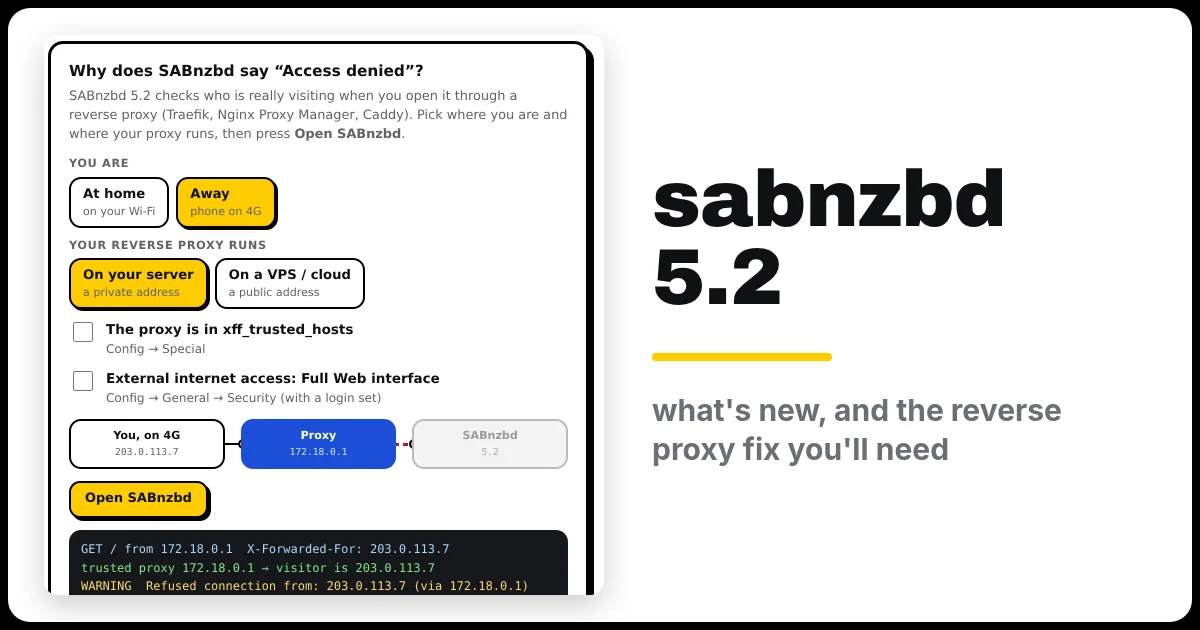
Choose whether you’re at home or away, and where your reverse proxy runs, then press Open SABnzbd. Tick the two boxes to see what each setting changes. Under it is the generator you’ll use in Step 2.
Open the generator full screen
What’s new in SABnzbd 5.2
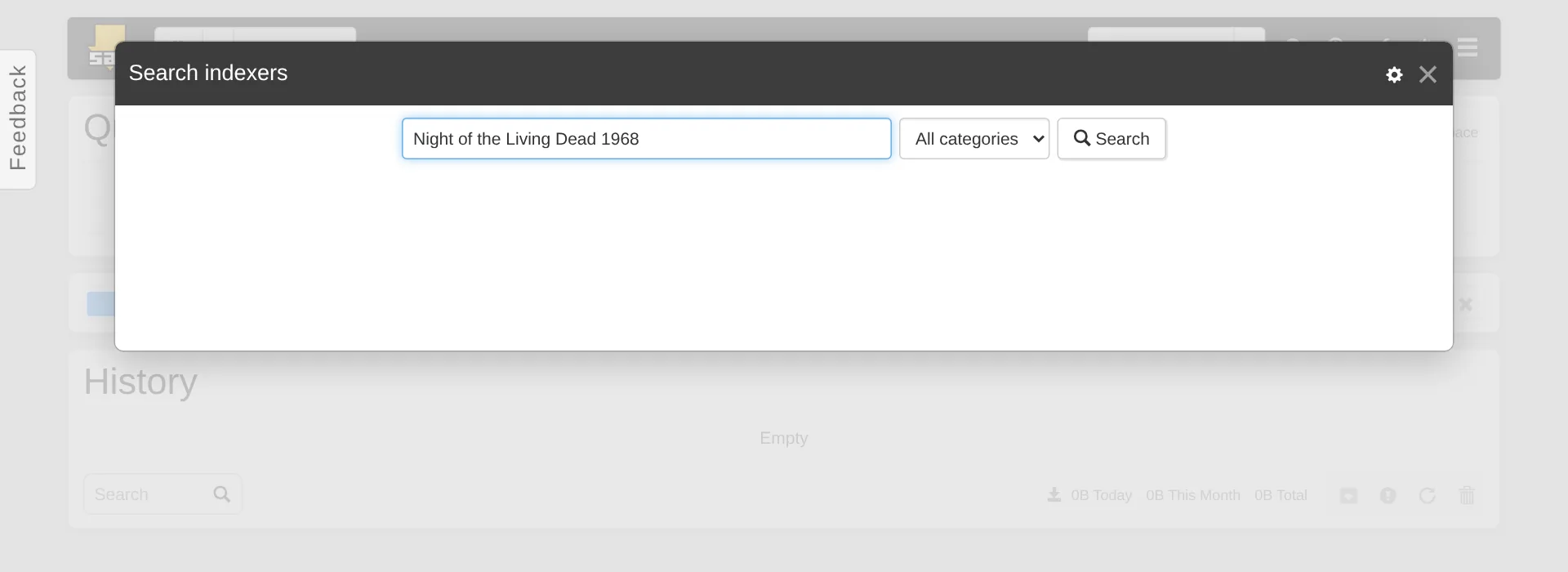
- Indexer Search. Add your Usenet indexers under Config → Indexers, then search them all at once from SABnzbd’s main page and add a download with one click. Handy for the odd thing that isn’t a film or a TV show.
- Straight to disk. Downloaded data is written directly to disk where your hardware allows it, which uses less memory and CPU, especially on SSDs.
- A new web server. SABnzbd now runs on Starlette instead of CherryPy. It looks the same, but it checks proxied requests more carefully (see Step 3).
- Active sessions. With a username and password set, the menu shows who is logged in.
- Fixes for two security problems (XSS in History and in news server replies), a stuck Unrar freezing post-processing, and downloads with missing articles and no repair files not being marked as failed.
Two changes can break things, so check them before you upgrade:
- Scripts (post-processing, pre-queue and notification) no longer get command-line arguments. They only get
SAB_*environment variables, such asSAB_COMPLETE_DIRandSAB_FINAL_NAME. If you wrote a script that uses$1,$3and so on, change it first. - Apps that read SABnzbd’s history through the API lose a few fields (
completeness,meta,series,idandscript_log). Radarr and Sonarr work fine; I checked mine after upgrading. Older or home-made tools might not.
What you need
- SABnzbd already running in Docker, set up as in my SABnzbd guide.
- A quiet moment: an empty queue, or at least nothing that’s nearly finished.
- If you open SABnzbd through a reverse proxy: the address that proxy connects from (Step 3).
- About 10 minutes.
Step 1: Back up first
Pause your downloads (the pause button at the top of SABnzbd), then stop SABnzbd and copy its whole config folder. That copy holds your servers, categories, history and settings, and it’s your way back to 5.1:
cd ~/sabnzbd
docker compose down
sudo cp -a /opt/arr/config/sabnzbd /opt/arr/config/sabnzbd-backup-$(date +%F)
Change /opt/arr/config to your own config folder. The generator’s Commands tab fills it in for you.
Step 2: Switch the image to the beta
In the generator, choose SABnzbd 5.2 (beta) and Upgrade my SABnzbd, and fill in your folders. The only real change in compose.yaml is the image line:
image: lscr.io/linuxserver/sabnzbd:unstable-5.2.0Beta2-ls378The generator pins the beta to one exact version. Betas change often, so this way SABnzbd only updates when you decide to. Don’t start it yet if you use a reverse proxy: do Step 3 first.
Step 3: Trust your reverse proxy
When you open SABnzbd through a reverse proxy, the proxy tells SABnzbd who’s really visiting, in a header called X-Forwarded-For. SABnzbd 5.2 only believes that header from proxies it trusts. Here’s what happens in each case:
- Your proxy runs on the same server or home network (it connects from a private address like
172.18.0.1or192.168.1.x). SABnzbd trusts it on its own. From home, everything works as before. - You open it while you’re away, through that proxy. SABnzbd now sees that you’re on the internet, so you get “External internet access denied”. If you do want to use SABnzbd from outside, go to Config → General → Security, make sure a username and password are set, and set External internet access to Full Web interface.
- Your proxy runs somewhere else, like a VPS with a public address. SABnzbd won’t trust it at all until its address is in xff_trusted_hosts.
To set it, go to Config → Special, find xff_trusted_hosts, type your proxy’s address, click Save Changes, then restart SABnzbd. Once you list one proxy, SABnzbd trusts only what’s listed (plus the server itself), so add every proxy you use, separated by commas.
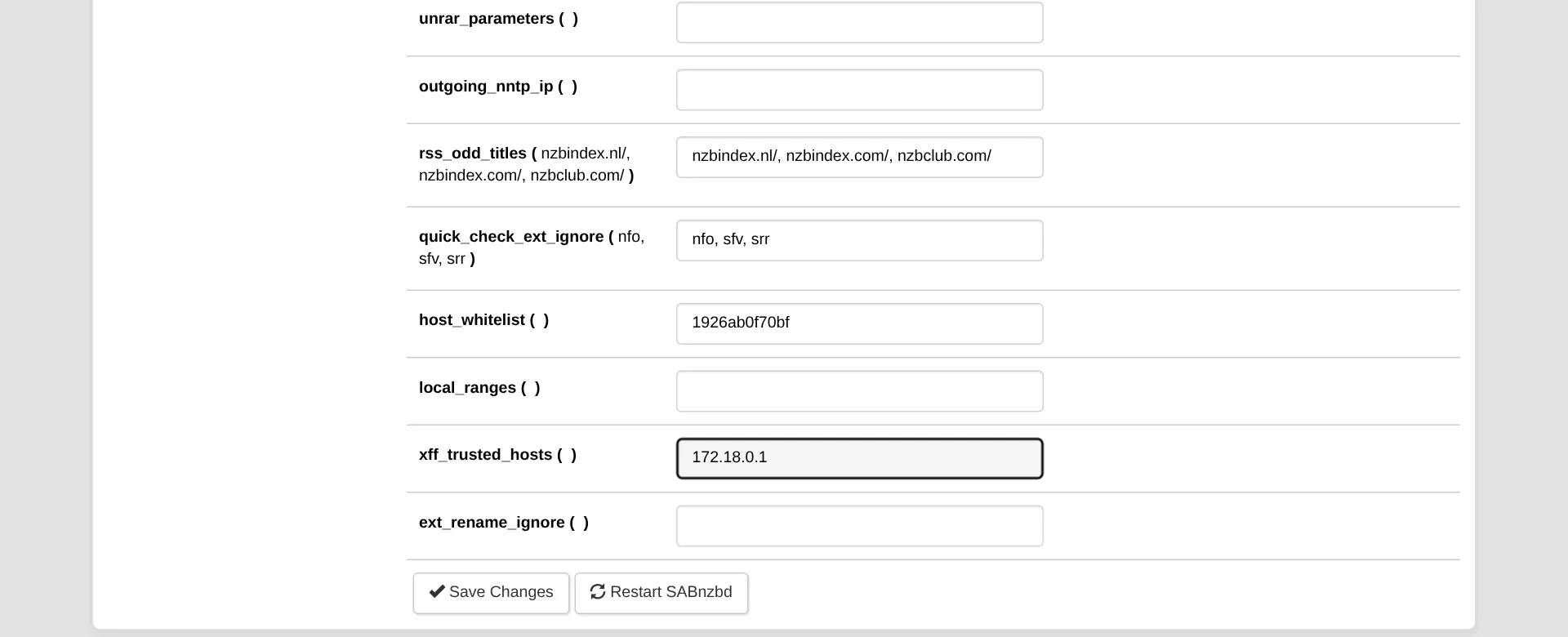
Locked out already? xff_trusted_hosts can’t be changed through SABnzbd’s API, so if you can’t reach the web page, set it in the config file instead, while SABnzbd is stopped. The generator’s Commands tab does exactly that, when you tick I open SABnzbd through a reverse proxy. Not sure which address your proxy connects from? Open SABnzbd through it once, then look at the warnings on SABnzbd’s main page: the refused visit ends with (via 172.18.0.1), and that’s your proxy’s address.
Now start SABnzbd 5.2:
docker compose pull && docker compose up -dStep 4: Turn on Indexer Search
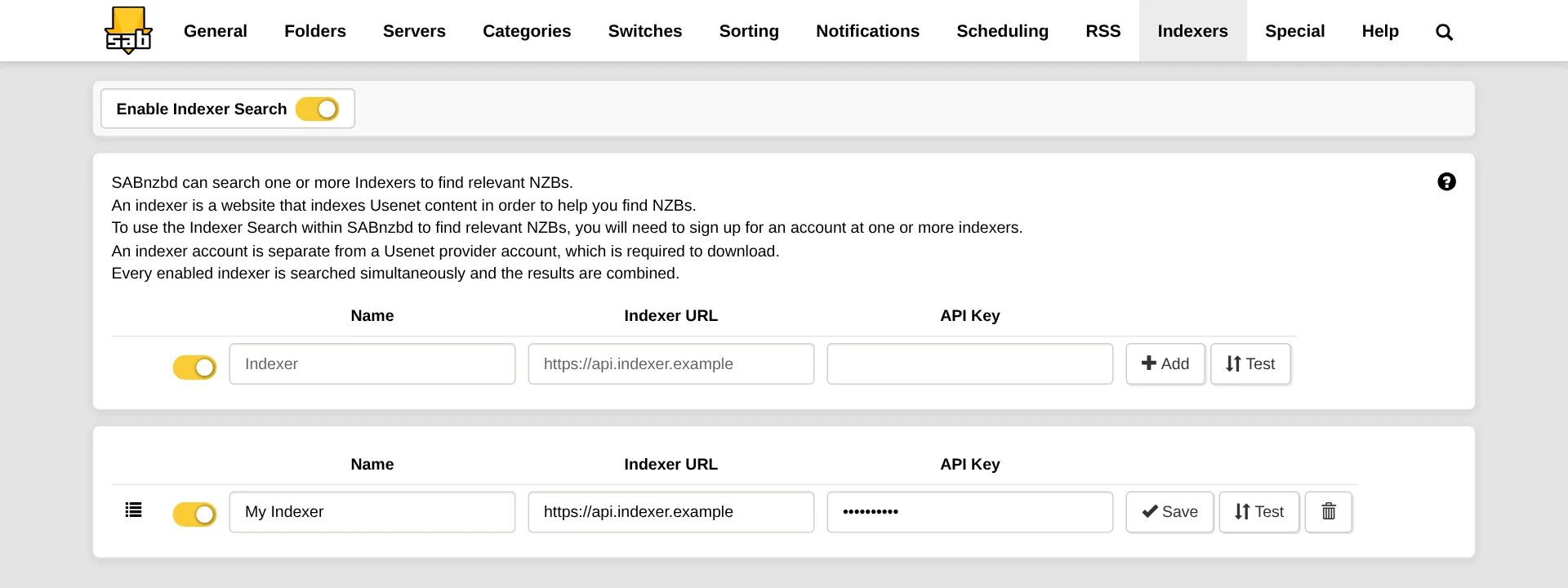
- Go to Config → Indexers and switch on Enable Indexer Search.
- For each indexer, type a Name, the Indexer URL (for example
https://api.nzbgeek.info) and your API Key from the indexer’s website. Click Add, then Test. - Go back to the main page and click the magnifying glass at the top to search.
Your indexers in Prowlarr, Radarr and Sonarr don’t change. This is only for searching by hand in SABnzbd.
Step 5: Check Radarr and Sonarr still connect
- In Radarr, go to Settings → Download Clients, open SABnzbd and click Test. You want a green tick.
- Do the same in Sonarr (and any other app that uses SABnzbd).
- Let one download run all the way through, and check it gets imported. If you use a post-processing script, check that it ran too.
Rather try it first? Run a test copy
In the generator, pick Test copy next to it. That gives you a second SABnzbd on port 8090, with its own config and download folders, so your normal one keeps running. Go through its setup wizard and add your news server again. Give it only a few connections: both copies log in to the same Usenet account, and together they must stay under your provider’s limit.
Going back to 5.1
cd ~/sabnzbd
docker compose down
sudo rm -rf /opt/arr/config/sabnzbd
sudo mv /opt/arr/config/sabnzbd-backup-YYYY-MM-DD /opt/arr/config/sabnzbd
Then set the image back to lscr.io/linuxserver/sabnzbd:latest and run docker compose up -d. Your settings and history go back to how they were before the upgrade. Finished files in your download folders aren’t touched.
If something’s wrong
- “External internet access denied” when you’re away. Expected with a proxy (Step 3). Set External internet access to Full Web interface, with a username and password set, or only use SABnzbd at home.
- “X-Forwarded-For received from …, which is not in xff_trusted_hosts”. Add the address it names to xff_trusted_hosts (Step 3).
- “Access denied – Hostname verification failed”. Not new in 5.2: the name you typed isn’t one SABnzbd knows. Add it to host_whitelist in Config → Special, or open SABnzbd by IP address.
- Your post-processing script stopped working. It’s reading
$1,$2… Change it to theSAB_*variables, for exampleDIR="$SAB_COMPLETE_DIR". - SABnzbd won’t accept your download folder. 5.2 doesn’t allow download folders inside SABnzbd’s own program folder any more. With Docker, keep downloads under
/data/usenetas in my SABnzbd guide.
Updating the beta
The beta is pinned, so a plain pull won’t change it. When a new one comes out (see the LinuxServer releases page for the newest unstable-5.2 tag), change the tag in compose.yaml, then:
cd ~/sabnzbd
docker compose pull && docker compose up -d
Staying on the stable version? Make sure you’re on at least 5.1.3: it has important security fixes. With the latest image, a docker compose pull && docker compose up -d gets it.
🧰 What I use
Proton VPN: works with Gluetun over WireGuard. Usenet downloads are already encrypted when you use SSL (port 563), so a VPN is optional for SABnzbd.
This is an affiliate link: if you sign up through it, I may earn a commission, at no extra cost to you. Use a VPN for privacy, and only download what you have the right to.
Frequently asked questions
What's new in SABnzbd 5.2?
You can search your indexers from inside SABnzbd, downloads are written straight to disk to save memory and CPU, and the web interface runs on a new web server. It also changes how SABnzbd treats a reverse proxy.
Why does SABnzbd 5.2 say "External internet access denied"?
Behind a reverse proxy, SABnzbd 5.2 treats visits as coming from the internet. Set External internet access to Full Web interface with a username and password, or only use it at home.
Why did my post-processing script stop working?
It's reading $1, $2… Change it to the SAB_* variables, for example DIR="$SAB_COMPLETE_DIR".
Can I go back to SABnzbd 5.1?
Yes, with the backup from Step 1. The section "Going back to 5.1" shows how.
Thank you
SABnzbd is made by the SABnzbd team and is free and open source. You can support them through their website, and read the full 5.2.0 Beta 2 release notes. Thanks also to LinuxServer.io for the image.
Related guides: SABnzbd · Radarr 7 · Sonarr 5 beta · Cloudflare Tunnel with Traefik
More app betas: Sonarr 5 · Radarr 7 · all betas
If this guide helped you, consider buying me a coffee. It helps keep guides like this one coming.
☕Buy me a coffeeGet new guides by email
About one email a month: new step-by-step guides and card releases. No spam, unsubscribe any time.
 spikey1965