
Use this at your own risk, and test it before relying on it, especially anything that controls a real device. Full disclaimer
Updated 15 November 2026
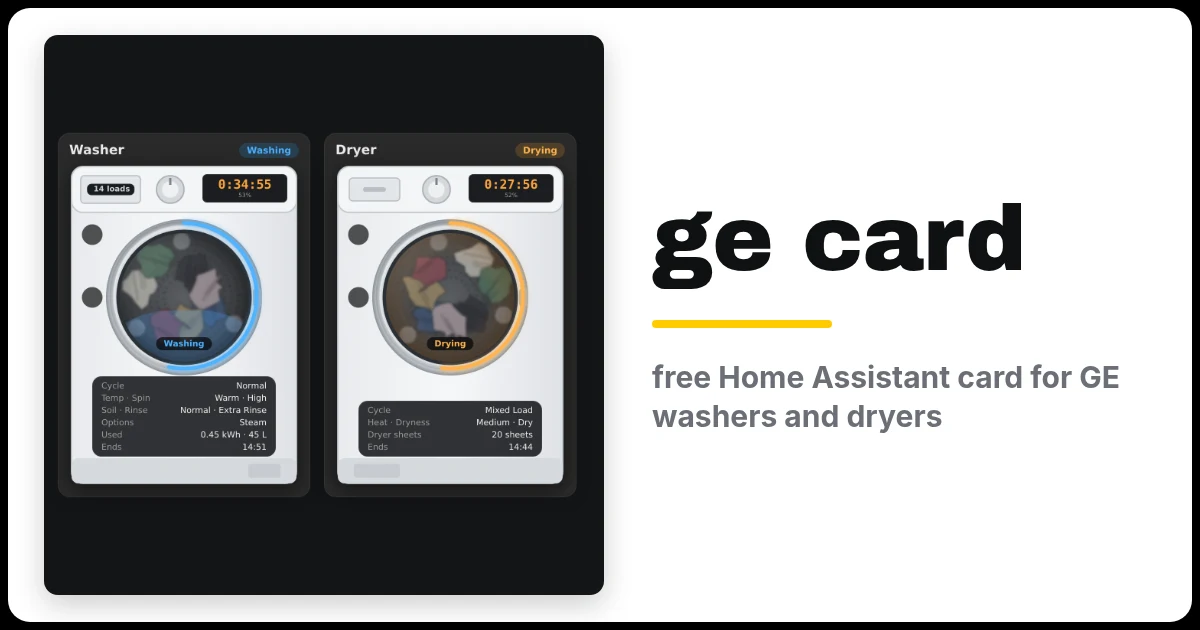
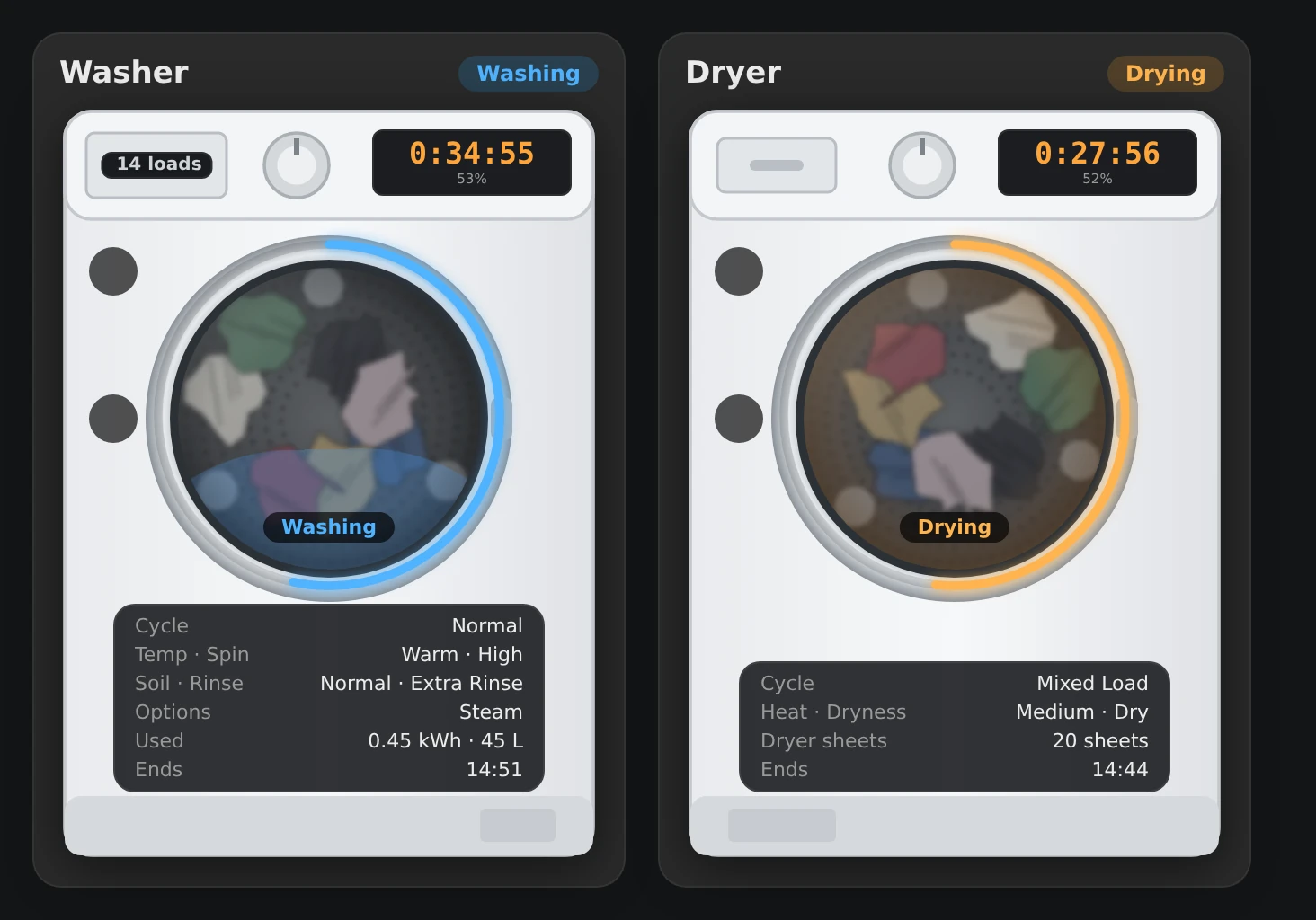
Got a GE washer or dryer (GE, GE Profile or Café) in Home Assistant? This free card shows it as a machine on your dashboard: the time left on its display, a progress ring round the door and the laundry turning in the drum. It’s a sister card of my hOn, Candy and Miele washer and dryer cards.
It works with the GE Home (SmartHQ) integration, and version 0.2.0 adds a lot: the door swings open when you open it, a laundry waiting reminder, SmartDispense detergent left, warnings for a blocked dryer vent, the energy and water each cycle used, and washer dryers.
Beta: testers wanted
The GE support was written by Katherine (@kedube), who has GE machines. I’ve tested every feature on simulated machines (that’s what the pictures on this page show), but it hasn’t been on many real GE washers and dryers yet.
If you have one, please try it and tell us how it goes: open an issue on GitHub with your model and a screenshot.
On this page (9 sections)
What the GE washer and dryer card shows
- The machine’s status: Off, Ready, Scheduled (a delayed start), the phase while it runs (Filling, Washing, Rinse, Spin, Drying, Cooldown and so on), Paused and Finished.
- The time left on the machine’s display with the percentage done, the time it will finish, and a progress ring round the door that turns green when it’s done.
- The cycle and settings: temperature and spin, soil and rinse on a washer, heat and dryness on a dryer, plus any options you chose (Steam, Prewash, TimeSaver, TumbleCare, Extended Tumble, EcoDry, WasherLink).
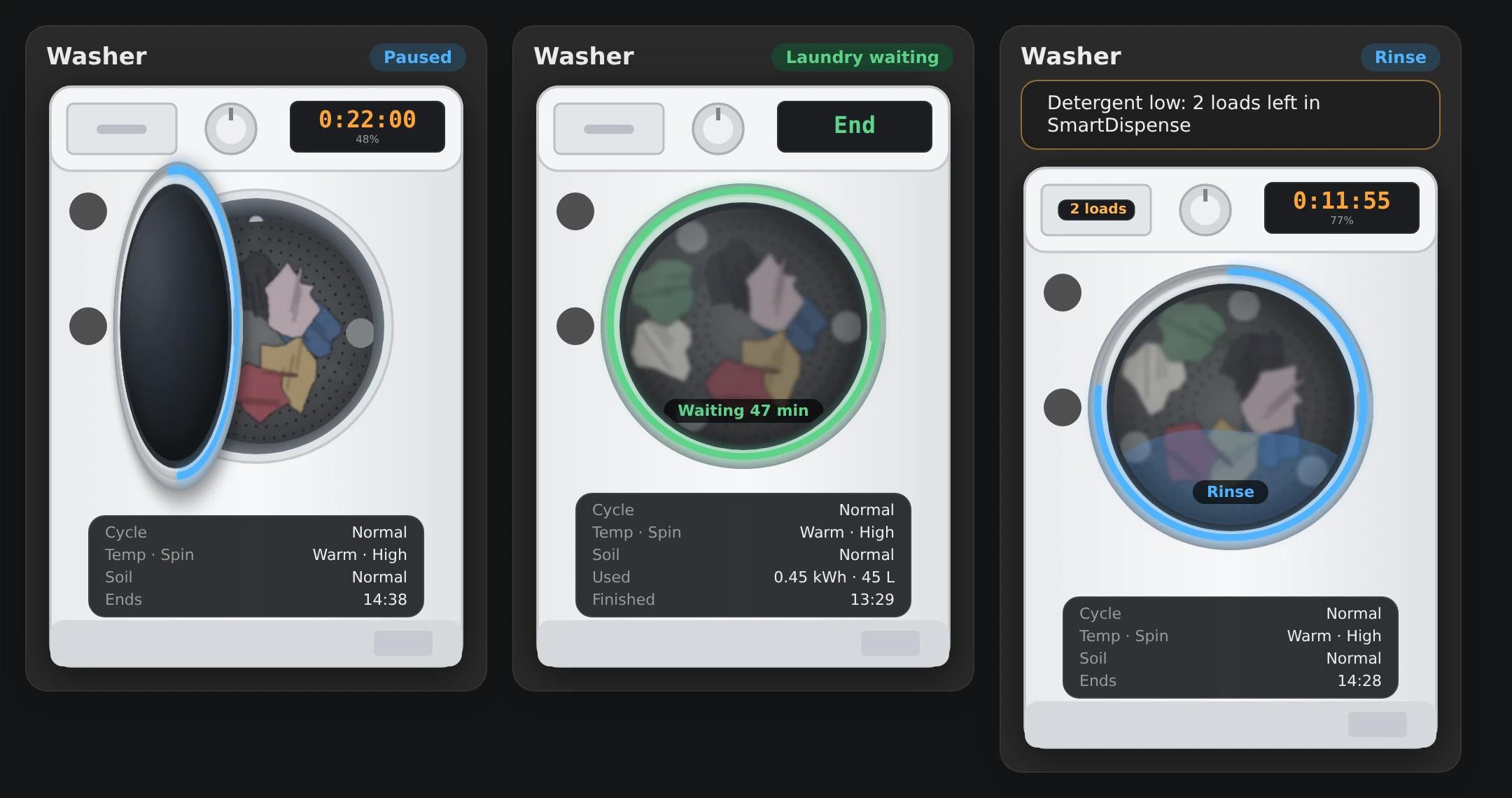
- A door that opens. Open the door mid-cycle and it swings open with the laundry inside. After the cycle, the drum is empty.
- Laundry waiting. If a cycle finishes and nobody opens the door, it says Laundry waiting and how long it’s been sitting there.
- SmartDispense: the loads of detergent left, on the dispenser drawer, turning amber when it’s low. Dryer sheets left, for dryers that report them.
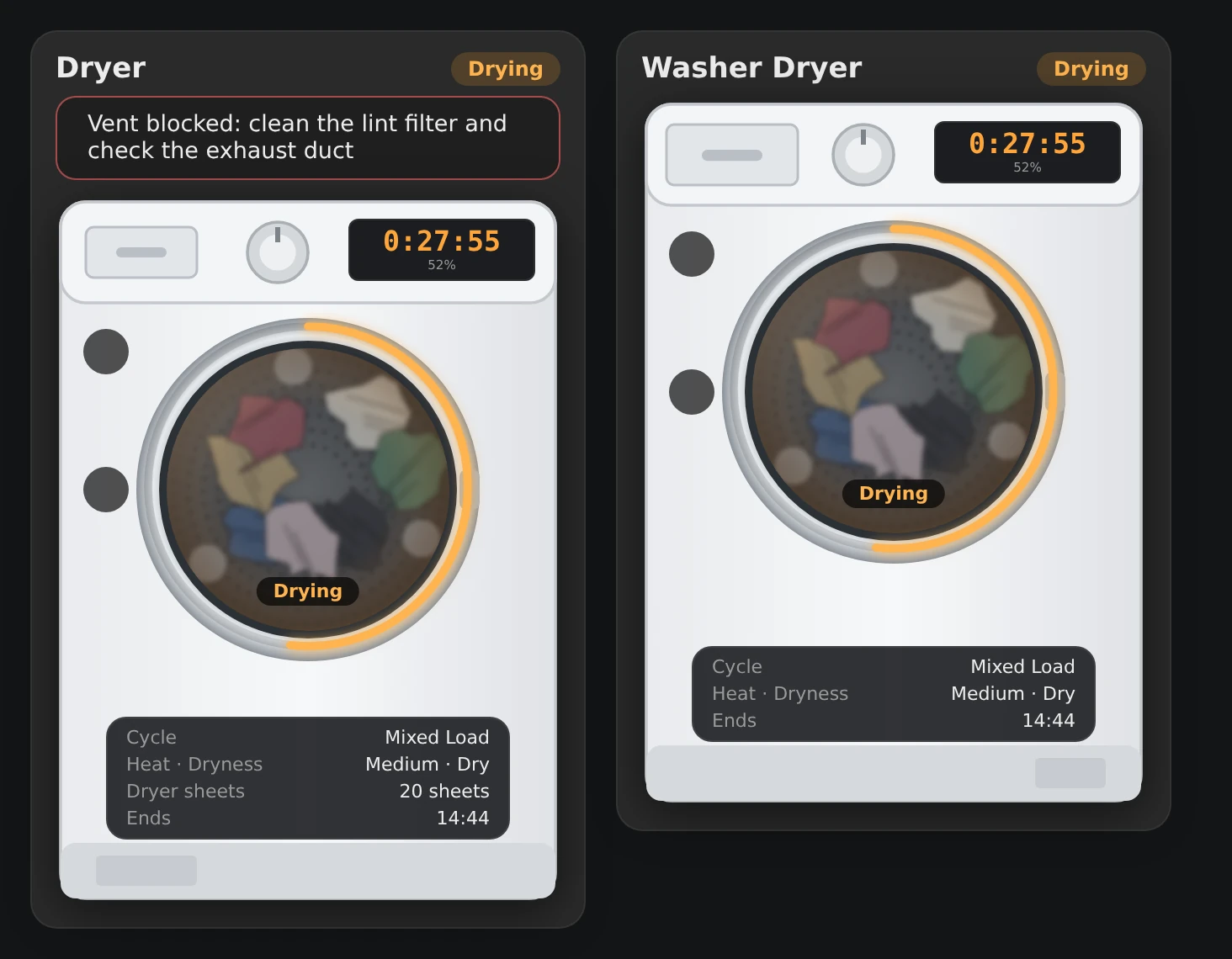
- Warnings above the machine: blocked vent (dryer), drain timeout (washer) and low detergent.
- Energy and water used by each cycle (and gas for a gas dryer), for machines that report it.
- Washer dryers: blue with water while washing, orange with heat while drying.
- A Start button for the cycle you chose on the machine, when Remote Enable is on.
Rows like soil, options, SmartDispense and energy only appear if your machine reports them, so the card never shows empty boxes.
Before you start
- Your washer and/or dryer in the SmartHQ app on your phone.
- The GE Home (SmartHQ) integration, version 2025.12 or newer, added with Add from link in Marketplace (a custom repository in HACS before 2026.11). Restart Home Assistant, then add GE Home (SmartHQ) under Settings → Devices & services.
- Remote Enable pressed on the machine if you want the Start button. Without it, the card still shows everything.
Step 1: Install it from Marketplace (formerly HACS)
⚡Open in Marketplace (one click)


The button opens Marketplace in your own Home Assistant with the card filled in. If asked, connect GitHub and click Add, then click Install. The first time, it asks for your Home Assistant’s address. Or do it by hand:
- In Home Assistant, open Settings → Marketplace and click Add from link. This asks you to connect GitHub.
- Paste
https://github.com/spikey1965/ha-ge-appliance-card, choose the type Dashboard if asked and click Add. - Find GE Appliance Card under New, open it and click Install. Because it’s a beta, Marketplace shows a short code such as
f5fa069instead of a version number, which is normal. To get the numbered beta instead, open the ⋮ menu → Include pre-releases → Include before you install. - Refresh the browser.
The first time you use Marketplace, tick I understand the risks and agree and click Continue. On a version older than 2026.11? Marketplace is still called HACS there (what changed in 2026.11). The same steps work, with Download in place of Install and ⋮ → Custom repositories in place of Add from link. For the beta there, open the ⋮ menu → Redownload and switch on Show beta versions.
⬇Get the GE card on GitHub (free)
Without Marketplace: download ge-appliance-card.js from the GitHub page and save it as config/www/ge-appliance-card.js. Then go to Settings → Dashboards → ⋮ menu → Resources (turn on Advanced mode in your user profile if you can’t see Resources), click Add resource, enter /local/ge-appliance-card.js?v=0.2.0, choose JavaScript module and refresh the browser.
It’s MIT licensed and free, and it can sit alongside my other washer cards because they all use different card names.
Step 2: Add the card
The easiest way: on your dashboard, Add card → GE appliance. The visual editor lists the GE machines it finds by name, so you can pick yours without looking anything up.
Or add a Manual card and paste this:
type: custom:ge-appliance-card
appliance: washer
For a dryer, change washer to dryer. For a washer dryer, use combo. The card finds your machine by itself.
Got more than one GE washer or dryer? Go to Settings → Entities and search for laundry_machine_state. GE entity names start with the machine’s serial number, like sensor.zl123456g_laundry_machine_state. Add the part before _laundry_machine_state as entity: zl123456g.
You can also set name, colour, style: photo (a more detailed illustration), finish (white, graphite or black) and hide, for example hide: [detergent] if you don’t use SmartDispense. The README on GitHub lists them all.
Get a phone alert
The card shows warnings while you’re looking at it. To be told on your phone when the dryer vent is blocked, add this automation (Settings → Automations → Create → ⋮ → Edit in YAML). Use your own machine’s serial number, and your phone’s notify action in place of notify.notify:
alias: Dryer vent blocked
triggers:
  - trigger: state
    entity_id: binary_sensor.gd987654_laundry_dryer_blocked_vent_fault
    to: "on"
actions:
  - action: notify.notify
    data:
      title: Dryer vent blocked
      message: Clean the lint filter and check the exhaust duct.
The README has two more: low detergent, and a reminder when the washer finishes and nobody opens the door within 30 minutes.
What it can’t do (yet)
- Pause, stop or choose a cycle from the card. GE Home can’t do those. Choose the cycle on the machine, press Remote Enable, then Start on the card.
- Energy and water need GE Home 2026.6 or newer and a machine that reports them. Many don’t.
- No cycle count, because GE doesn’t report one.
If something’s wrong
- No Start button: press Remote Enable on the machine, and make sure it’s on and showing Ready.
- The card shows Off and “—” everywhere: it didn’t find your machine. Set
entityas described in Step 2. - The door doesn’t open in the picture: check
binary_sensor.…_laundry_doorchanges in Developer Tools → States when you open the door. - “Laundry waiting” when it isn’t: the door was probably opened while Home Assistant was restarting. Open and close the door once, or add
waitingtohide.
Help test it
The most useful thing to send is your model and a screenshot of the card while a cycle is running, plus anything that looks wrong. Open an issue on GitHub.
Frequently asked questions
Which GE machines does the card work with?
GE, GE Profile and Café washers, dryers and washer dryers added to Home Assistant with the GE Home (SmartHQ) integration.
Why is there no Start button?
Press Remote Enable on the machine, and make sure it's on and showing Ready.
Why does the card show Off and dashes everywhere?
It didn't find your machine. Set entity as described in Step 2.
Is the GE card finished?
It's a beta. The GE support was written by a GE owner and every feature was tested on simulated machines, so reports from real machines are very welcome.
Thank you
A huge thank you to Katherine (@kedube), who wrote the GE support and this whole 0.2.0 update. Thanks also to simbaja for the GE Home integration. The card isn’t affiliated with or endorsed by GE Appliances, Haier or SmartHQ.
More cards in beta: Candy, Haier and Hoover (Simply-Fi) · Frigate Timeline (CCTV) · Kid Watch (parental controls) · all betas
If you like the card, consider buying me a coffee. It helps keep projects like this one free.
More free Home Assistant cards
All free, with a live demo and step-by-step setup.
Want one made for your home? See custom cards and dashboards.
Get new guides by email
About one email a month: new step-by-step guides and card releases. No spam, unsubscribe any time.
 spikey1965