
Use this at your own risk, and test it before relying on it, especially anything that controls a real device. Full disclaimer
Updated 8 November 2026
Home Assistant 2026.11 came out on 4 November 2026, and the big change is the new Home Assistant Marketplace. It’s where you now install community integrations, dashboard cards, themes and templates, and it replaces HACS, which most of us added by hand for years. If you already use HACS, it moves over by itself when you update. This post explains what the Marketplace is, what happens to HACS, the few things worth checking afterwards, and what else is new in 2026.11.
On this page (10 sections)
- 1What the Home Assistant Marketplace is
- 2What happens to HACS when you update
- 3Things to check after updating
- 4How to install something from the Marketplace
- 5Adding a project that isn’t in the catalogue
- 6Updates and test versions
- 7What else is new in Home Assistant 2026.11
- 8Updating to Home Assistant 2026.11
- 9My cards in the Marketplace
- 10Frequently asked questions
What the Home Assistant Marketplace is
The Marketplace is built into Home Assistant, so there’s nothing to install. You’ll find it under Settings → Marketplace. It works on every type of install, including Home Assistant in Docker, and it’s free.
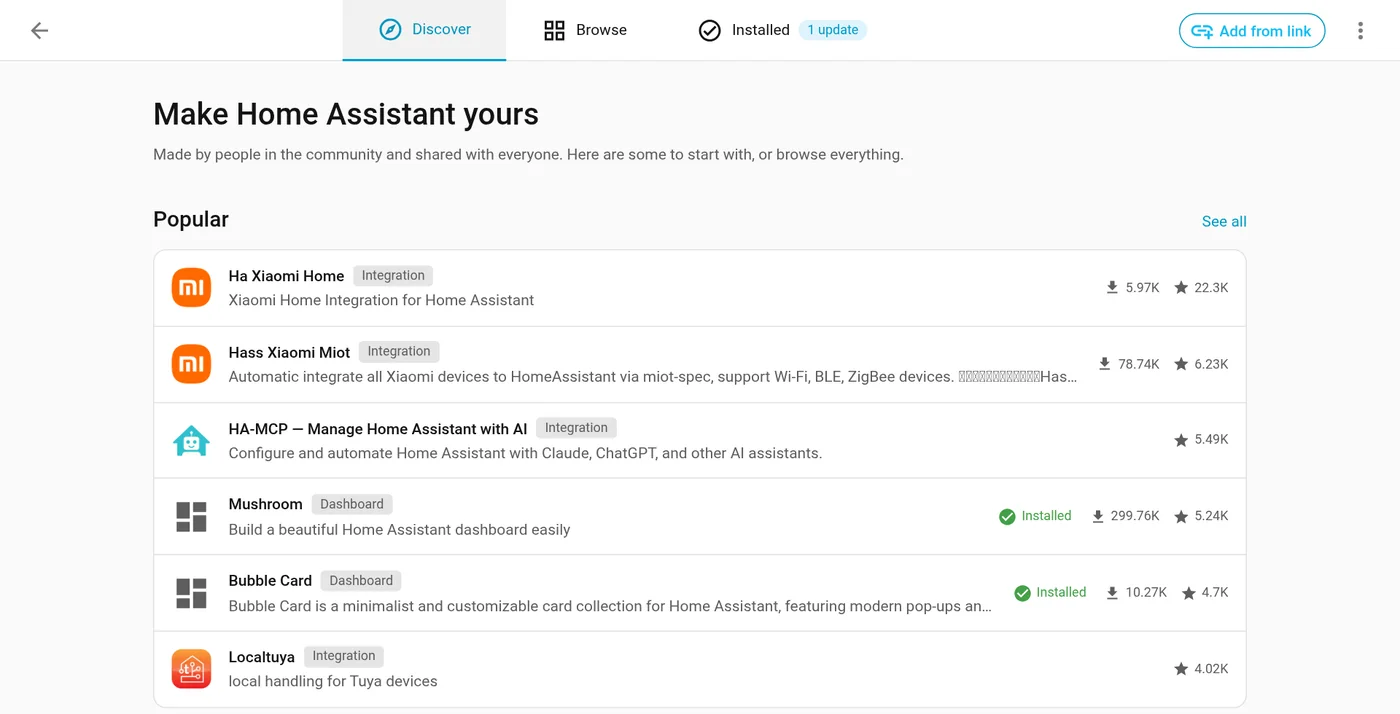
It opens on Discover, with popular and recently updated projects. Browse lists everything (over 6,000 projects) with search, filters and sorting, and Installed shows what you have, with a count of updates waiting. Add from link is in the top right.
- What’s in it: community integrations (support for devices and services Home Assistant doesn’t cover), dashboard cards, themes and templates. It’s the same community catalogue HACS used.
- Who can use it: administrators only.
- No GitHub account needed to browse, install or update things from the catalogue. You only need one to add a project that isn’t listed (more on that below).
- A notice the first time. The first time you open it, a box called Before you install from the Marketplace explains that everything in it is made by the community and isn’t reviewed by Home Assistant. Tick I understand the risks and agree, then click Continue. You can browse before agreeing, but you can’t install or update anything until you do.
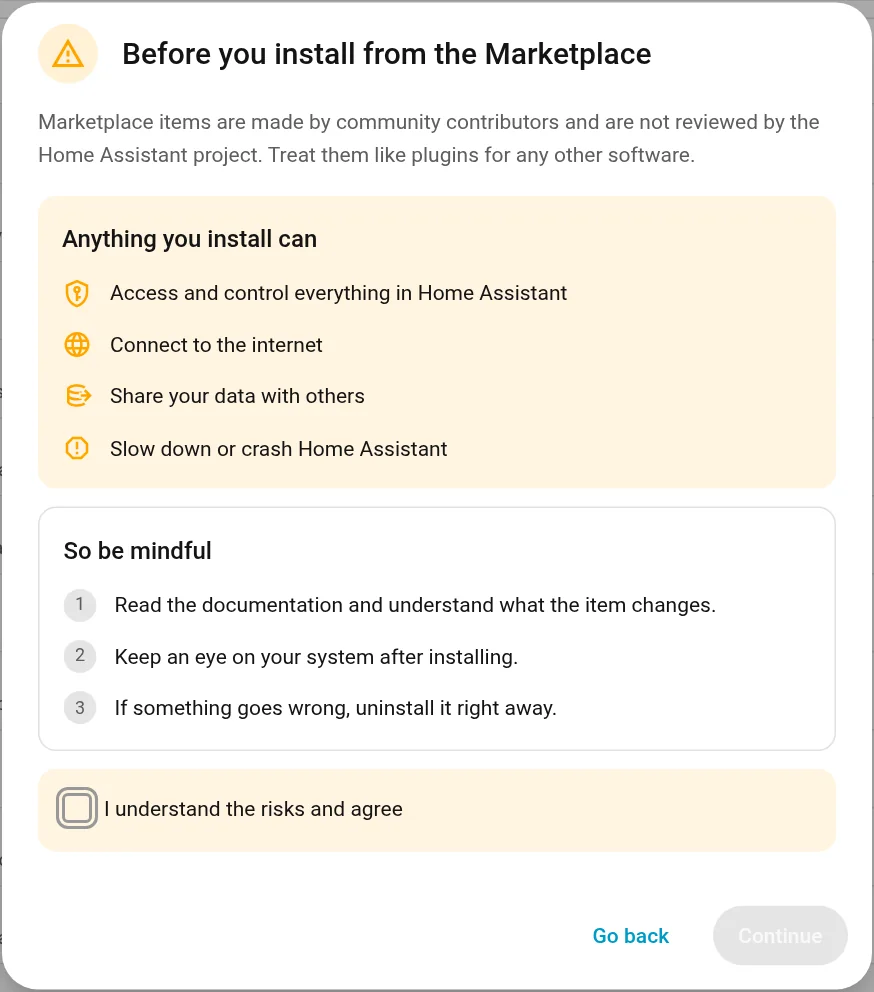
That notice is worth taking seriously. A community integration runs inside your Home Assistant with access to your devices and data, so check who made it, when it was last updated and what other people say before you install it. Each project’s page in the Marketplace shows its downloads, GitHub stars, last update and open issues to help with that.
What happens to HACS when you update
If you had HACS, you don’t need to do anything. The first time Home Assistant starts on 2026.11:
- Everything you installed through HACS stays installed and keeps getting updates, now through the Marketplace.
- Your custom repositories and their update entities carry over.
- The HACS integration and its files are removed.
- Old links and bookmarks to HACS open the Marketplace instead.
From 2026.11 you can’t install HACS separately any more, and HACS itself won’t get new releases. If something you installed doesn’t work, report it to its author from the Issue tracker link on its Marketplace page.
Things to check after updating
For most people the move is invisible. These are the cases where you might need to change something:
- Dashboard resources in YAML. Cards now live under
/local/community/. The old/hacsfiles/paths still work, but if you manage your dashboard resources in YAML, update them to the new path. If you added resources in the normal way (through the UI), the Marketplace handles this for you. - Templates that count HACS entities.
integration_entities('hacs')no longer finds anything. Useintegration_entities('marketplace')instead. - AppDaemon apps and Python scripts aren’t managed or updated by the Marketplace. They keep working, but you’ll need to update them yourself.
- HACS options have gone, and custom integrations that read HACS data won’t find it any more.
- Names on your dashboards may change. This isn’t about the Marketplace, but it’s the change in 2026.11 people notice most. Cards, badges and rows without a name set now show the device name followed by the entity name. Automations aren’t affected because entity IDs don’t change. To tidy it up, rename the device or entity, turn on Main entity of the device for the one that represents the device, or give the card a name.
How to install something from the Marketplace
- Go to Settings → Marketplace and search for what you want.
- Open its page and click Install.
- Check the version in the box that opens, then click Install again.
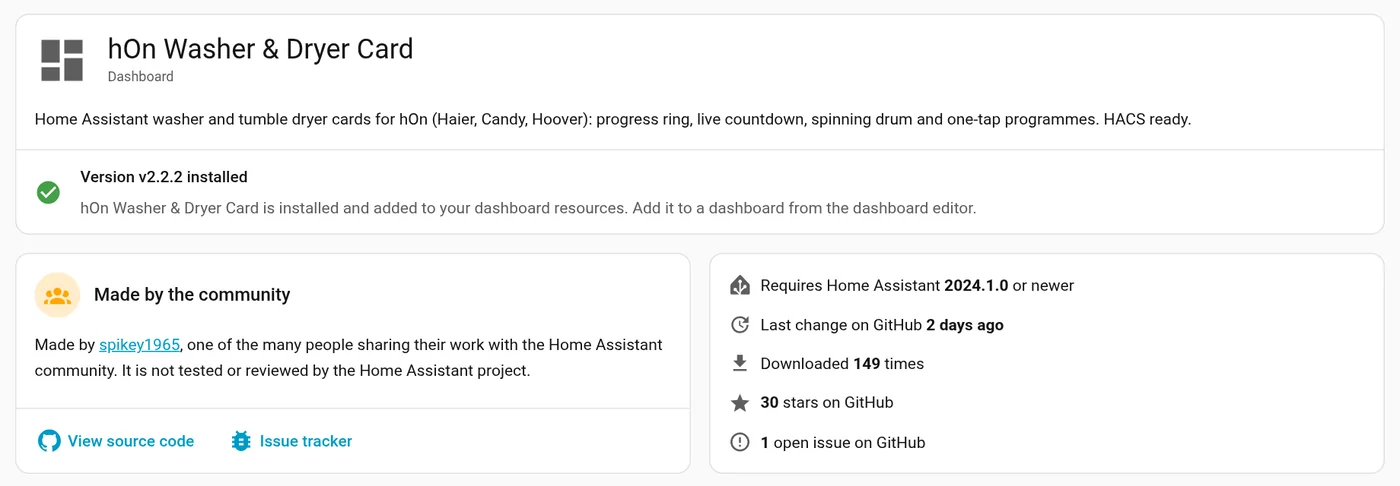
Each project’s page shows whether it’s installed, who made it, the Home Assistant version it needs, how many people have downloaded it, its GitHub stars and open issues. View source code and Issue tracker take you to its GitHub page. Here it’s my hOn card, already installed.
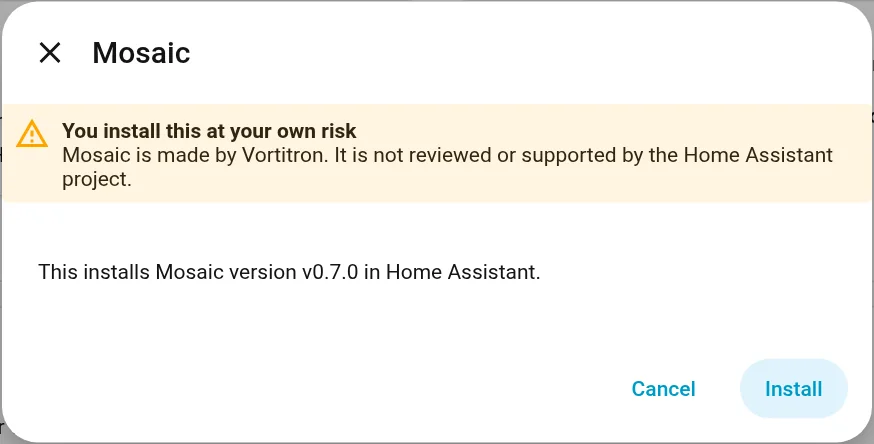
The box you see after clicking Install reminds you who made it and which version it installs. Click Install to go ahead, or Cancel.
What happens next depends on what you installed:
- An integration: its setup opens straight away if it can, so there’s no longer a download, restart, then add it again. If it can’t load yet, add it later under Settings → Devices & services. Some, especially ones set up in YAML, still need a restart, and a repair under Settings → System → Repairs reminds you and can restart Home Assistant for you.
- A dashboard card: reload your browser, then add the card to a dashboard.
- A theme or template: ready straight away, no restart.
To remove something, open its page, click the three dots and choose Uninstall. An integration has to be removed from Devices & services first, or you can choose Delete and uninstall to do both. That also deletes its devices and entities.
Adding a project that isn’t in the catalogue
Newer projects and test versions often aren’t in the catalogue yet. You can still add them from their GitHub page:
- Go to Settings → Marketplace.
- Click Add from link in the top right.
- Paste the GitHub link (or
owner/repository) into GitHub link and click Add.
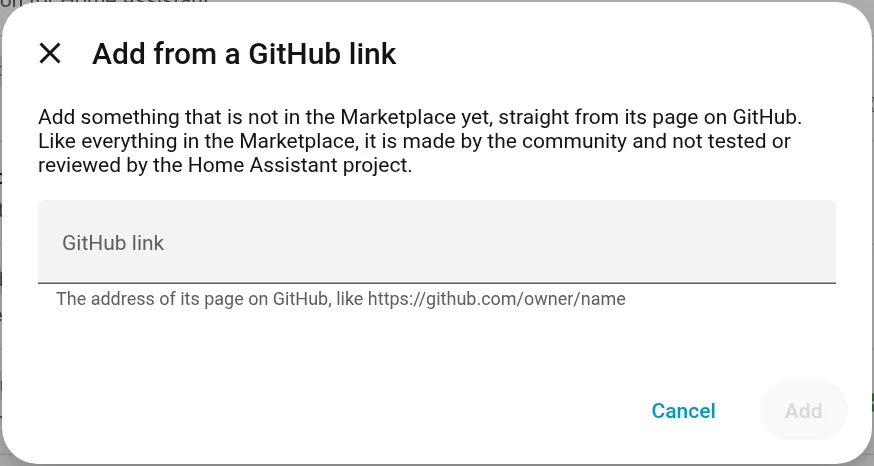
The first time, it asks you to connect a GitHub account. This uses GitHub’s device sign-in: you approve it on GitHub, without typing your GitHub password into Home Assistant, and it can only read public information. Once a project is added, you install it just like one from the catalogue.
Updates and test versions
Every project you install gets an update entity, so new versions show up under Settings → Updates, next to Home Assistant’s own updates. The Marketplace checks for new versions every 6 hours. After updating an integration, restart Home Assistant to use the new version (a repair reminds you).
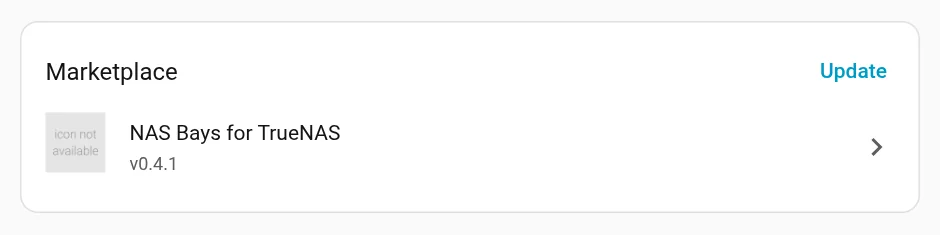
Marketplace updates have their own group, with an Update button. This one is for my NAS Bays card.
Only finished releases are offered by default. If you want test versions (pre-releases) of a project, for example to help test a card, open the project’s device page, enable the Pre-release entity (it’s off by default), then turn the switch on.
If you need to go back after an update, restore a backup. The Marketplace has an Install another version option, but Home Assistant says not to use it to roll back.
What else is new in Home Assistant 2026.11
- Exclude targets. Leave out entities, devices, areas, floors or labels when you target a group, for example “every light downstairs except the hall”.
- Copy and paste dashboard sections, including between views and dashboards.
- Automatic dashboard sections that fill themselves with cards as you add devices.
- New cards and badges: a Date card, an Alert badge that can pulse, and colour options for Sensor cards.
- Better logs. A Show logs button on each integration shows only its own log lines, and a new Action history tab under Settings → Tools lists what ran and why.
- Matter cameras show up as cameras with live video.
- Local disk storage: add an internal or USB drive for backups and media.
The full release notes list everything, including 38 new integrations.
Updating to Home Assistant 2026.11
Take a backup first (Settings → System → Backups) so you can go back if something doesn’t suit you. Then:
- Home Assistant OS: the update appears under Settings → Updates.
- Docker: go to your Home Assistant folder and pull the new image:
cd ~/homeassistant
docker compose pull
docker compose up -d
My Home Assistant Docker Compose guide covers this in more detail, including how to stay on a version you choose.
Before you update, read the “Backward-incompatible changes” part of the release notes for anything you use. After the update, open Settings → Marketplace once, accept the notice, and check your dashboards for names that changed.
My cards in the Marketplace
The hOn washer and dryer card and the Toyota card are in the Marketplace catalogue, so you can search for them by name. My newer cards, like the TrueNAS card, Frigate Timeline card and Roborock Buddy card, each have an Open in Marketplace button in their post that adds them for you.
Frequently asked questions
Does Home Assistant 2026.11 replace HACS?
Yes. The new Marketplace, under Settings → Marketplace, replaces HACS. It uses the same community catalogue, it's built in, and it works on every type of install, including Docker.
What happens to my HACS integrations and cards when I update?
Nothing you need to do. Everything you installed stays installed and keeps getting updates through the Marketplace, and your custom repositories carry over. The HACS integration itself is removed.
Do I need a GitHub account for the Marketplace?
Not to browse, install or update things from the catalogue. You only need one to add a project that isn't listed, with Add from link.
Why did names on my dashboard change after 2026.11?
Cards without a name set now show the device name followed by the entity name. Rename the device or entity, or give the card a name. Automations aren't affected because entity IDs don't change.
Do I need to change my dashboard resources?
Only if you manage them in YAML. Cards now live under /local/community/. The old /hacsfiles/ paths still work, but update them when you can.
Thank you
Thanks to the Home Assistant team at the Open Home Foundation, and to the HACS developers, whose years of work became the Marketplace.
Related guides: Install Home Assistant with Docker Compose · Home Assistant Wall Tablet · Frigate with Home Assistant
If this guide helped you, consider buying me a coffee. It helps keep guides like this one coming.
Get new guides by email
About one email a month: new step-by-step guides and card releases. No spam, unsubscribe any time.