
For educational purposes only. This guide shows how to install self-hosted software on your own hardware. I don't condone piracy: only use these apps with media you own or have the right to use, and follow the law where you live. Back up your data first. Full disclaimer
Updated 16 November 2026 Tested with: ClamAV 1.5.4
Radarr and Sonarr import whatever your download client gives them, and nothing checks what’s inside. ClamAV is a free virus scanner that can check every finished download, move anything infected out of the way and send you an alert. It can also scan your whole library once a week.
This guide sets up ClamAV with Docker Compose in five short steps. It takes about 20 minutes, most of it waiting for the first virus database download.
On this page (11 sections)
- 1Watch: install ClamAV with Docker Compose
- 2See what ClamAV catches
- 3What you need to set up ClamAV with Docker Compose
- 4Step 1: Make your compose file
- 5Step 2: Start it
- 6Step 3: Prove it catches something
- 7Step 4: Scan your library every week
- 8Step 5: Scan every download as it finishes
- 9If it doesn’t work
- 10Updating ClamAV
- 11Frequently asked questions
Watch: install ClamAV with Docker Compose
The video has subtitles at the bottom and no sound. It was recorded on a clean test install of ClamAV 1.5.4, and the scan results are real. The EICAR test file is a harmless line of text that every virus scanner is built to detect.
See what ClamAV catches
Pick a download and press Next. Then stop ClamAV or break the path to see what happens. Under the demo is the generator that writes your files.
Open the generator full screen
What you need to set up ClamAV with Docker Compose
- A computer or NAS running Docker. New to Docker? The Docker install guide covers Windows, Mac and Linux.
- About 2 GB of spare memory. It used about 1 GB once running in a test, and ClamAV can need more while it updates its database.
- Optional but recommended: Gotify for alerts, so they reach your phone (my guide covers Android and iPhone). Without alerts, a failed scan looks just like a clean one.
Step 1: Make your compose file
In the generator, pick your download clients and fill in your details. Save compose.yaml and .env in a new folder. It looks like this:
services:
  clamav:
    image: clamav/clamav:stable
    container_name: clamav
    environment:
      - TZ=${TZ}
    # Lets the scanner read folders that only your media group can open
    entrypoint: ["/bin/sh", "-c"]
    command:
      - |
        sed -i 's/^clamav:x:101:/clamav:x:${PGID}:/' /etc/group
        exec /init
    volumes:
      - ${CONFIG_ROOT}/clamav:/var/lib/clamav
      # Read-only, at the same path your download clients use
      - ${DATA_ROOT}:/data:ro
    ports:
      - 3310:3310
    healthcheck:
      test: ["CMD", "clamdcheck.sh"]
      interval: 60s
      timeout: 10s
      retries: 5
      start_period: 300s
    restart: unless-stopped
Two things have to be right:
- The path. If qBittorrent calls a download
/data/torrents/Film, ClamAV must find it at exactly that path. If your apps use something else, such as/media, change Data path in your apps in the generator. - PGID. Use the group that owns your files. That
sedline lets the scanner open them, even if only that group can.
Port 3310 has no login, so anyone who can reach it can ask for a scan. Keep it on your home network, and don’t forward it from your router.
Step 2: Start it
sudo mkdir -p /opt/arr/config/clamav
docker compose up -d
docker compose ps
The first start downloads the virus database, so give it a few minutes. It’s ready when docker compose ps says healthy. After that, it updates the database by itself.
Step 3: Prove it catches something
The EICAR test file is harmless text that every virus scanner treats as a virus, so you can test safely. Save this line as eicar.txt:
X5O!P%@AP[4\PZX54(P^)7CC)7}$EICAR-STANDARD-ANTIVIRUS-TEST-FILE!$H+H*Your own computer’s antivirus may delete it, which proves that one works too. Then scan it:
docker cp eicar.txt clamav:/tmp/eicar.txt
docker exec clamav clamdscan --fdpass /tmp/eicar.txt
You should see this:
/tmp/eicar.txt: Eicar-Test-Signature FOUNDStep 4: Scan your library every week
This catches anything already on disk, and anything a new virus definition now recognises. The generator’s weekly-scan.sh tab has the script, with your details filled in. Save it next to compose.yaml, then:
chmod +x weekly-scan.sh
(crontab -l 2>/dev/null; echo "0 3 * * 3 $PWD/weekly-scan.sh") | crontab -
That runs it at 03:00 every Wednesday. You’ll get an alert either way, so you’ll also notice if it stops. On a NAS, you may prefer its own scheduled tasks page.
Step 5: Scan every download as it finishes
The generator’s scan-download.sh tab works for both clients. Save it in your client’s config folder, in a new scripts folder, and run chmod +x scan-download.sh. Then:
- qBittorrent: go to Tools → Options → Downloads, tick Run external program on torrent finished, and paste the line below.
- SABnzbd: go to Config → Folders and set Scripts Folder to
/config/scripts. Then go to Config → Categories and pickscan-download.shas the script for the Default row.
/config/scripts/scan-download.sh "%F" "%N"When it finds something, only the infected file moves to .quarantine in your data folder, and the rest of the download stays. Nothing is deleted, so you can put a file back if it was a false alarm.
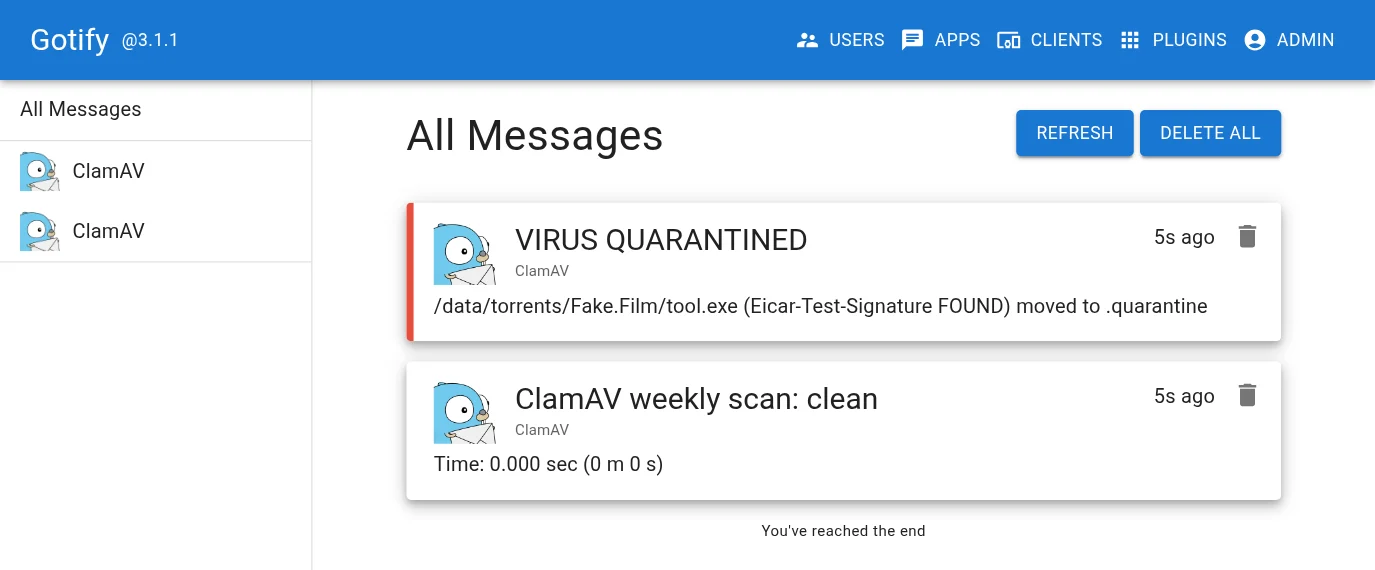
Test it now, not after a real virus. This pretends a download just finished, using the same test file. Check for the alert, then delete the file from .quarantine:
docker exec -u abc qbittorrent mkdir -p /data/torrents/clamav-test
docker exec -i -u abc qbittorrent sh -c 'cat > /data/torrents/clamav-test/eicar.com' < eicar.txt
docker exec -u abc qbittorrent /config/scripts/scan-download.sh /data/torrents/clamav-test test
If it doesn’t work
| What you see | What to do |
|---|---|
File path check failure: No such file or directory. ERROR |
ClamAV can’t see the path your client uses. Make the /data volume match your client’s. |
File path check failure: Permission denied. ERROR |
ClamAV can’t open the folder. Check PGID matches the group that owns your files. |
| Alert: ClamAV unreachable | ClamAV is stopped, or port 3310 is blocked. Run docker compose ps, and check the server IP in the script. |
| Not healthy yet on the first start | It’s probably still downloading the database. Check with docker compose logs clamav. |
| A fake release gets through | Files over 100 MB are skipped. Use Cleanuparr’s blocklist for those. |
Updating ClamAV
cd ~/clamav
docker compose pull && docker compose up -d
I tested this guide on ClamAV 1.5.4, using these exact scripts inside qBittorrent and SABnzbd containers, with the EICAR file standing in for a finished download. That covered quarantine, alerts, a failed path, ClamAV being stopped, and a data folder only one group can open. I didn’t click through the qBittorrent and SABnzbd settings in that test; those steps come from a working setup.
Frequently asked questions
Does ClamAV scan films?
No. ClamAV skips any file over 100 MB and still reports OK, so it won't look inside a film or catch a big fake release. It's for small files: programs, scripts and archives.
How do I stop fake movie releases that are really programs?
Use Cleanuparr's malware blocklist for those. ClamAV covers the small files. See my Cleanuparr guide.
Why is ClamAV not healthy on first start?
It's probably still downloading its virus database, which can take a while. Check with docker compose logs clamav.
How do I know ClamAV scans are really working?
Do the test in Step 3 with a harmless test file. The scripts in this guide alert you when a scan fails, not only when a virus is found, because a wrong path makes every file look clean.
Thank you
ClamAV is free and open source, maintained by Cisco Talos and its community.
Related guides: Media Server Stack · qBittorrent · SABnzbd · Cleanuparr
If this guide helped you, consider buying me a coffee. It helps keep guides like this one coming.
Get new guides by email
About one email a month: new step-by-step guides and card releases. No spam, unsubscribe any time.
 spikey1965