

Plex is the media server that sits at the end of your pipeline. Once Radarr or Sonarr imports a file, Plex picks it up, fetches metadata and artwork, and makes it available to stream on any device — browser, phone, smart TV, or Fire Stick. With an NVIDIA GPU in the mix, transcoding happens in hardware, so even an old CPU can serve multiple streams simultaneously.
What you need before you start
- A Plex account — free at plex.tv. You’ll need a claim token on first run to link the server to your account
- A media dataset on your TrueNAS pool — e.g.
/mnt/tank/mediawithmovies/andtv/subdirectories - Radarr and Sonarr already running and importing files — Plex just watches the folder; the arr stack does the downloading
- Optional but recommended: an NVIDIA GPU for hardware transcoding (the linuxserver image supports it out of the box)
Get your Plex claim token
Visit plex.tv/claim while logged in to your Plex account and copy the token (it expires in 4 minutes). You’ll paste it into the compose file below. This links the container to your account on first boot so you can manage it remotely.
Docker Compose
Create /mnt/tank/stacks/plex/docker-compose.yml:
services:
  plex:
    image: lscr.io/linuxserver/plex:latest
    container_name: plex
    network_mode: host
    environment:
      - PUID=568
      - PGID=568
      - TZ=Europe/London
      - VERSION=docker
      - PLEX_CLAIM=claim-xxxxxxxxxxxxxxxxxxxx
      - NVIDIA_VISIBLE_DEVICES=all
      - NVIDIA_DRIVER_CAPABILITIES=compute,video,utility
    volumes:
      - /mnt/tank/configs/plex:/config
      - /mnt/tank/media:/media
      - /tmp/plex-transcode:/transcode
    restart: unless-stopped
Then bring it up:
cd /mnt/tank/stacks/plex
docker compose up -d
docker compose logs -f plex
Plex will be available at http://<your-nas-ip>:32400/web within about 30 seconds.
network_mode: host is intentional. Plex uses host networking so it can discover clients on your LAN via multicast (GDL/Bonjour). Without it, local clients may not auto-discover the server and you’ll need to add it manually by IP. There are no
ports:entries when using host mode — Plex binds directly to port 32400 on the host.
First-time setup
1 — Add your media libraries
On first login at http://<nas-ip>:32400/web, the setup wizard asks you to add libraries. Add two:
- Movies — point it to
/media/movies(the path inside the container) - TV Shows — point it to
/media/tv
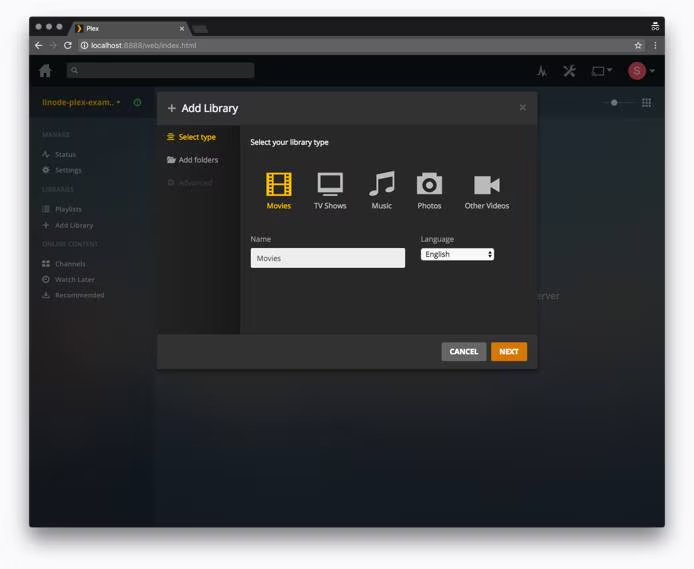
Plex will scan both folders, match every file against TMDB and TheTVDB, and pull down posters, backdrops, and descriptions automatically.
2 — Enable hardware transcoding
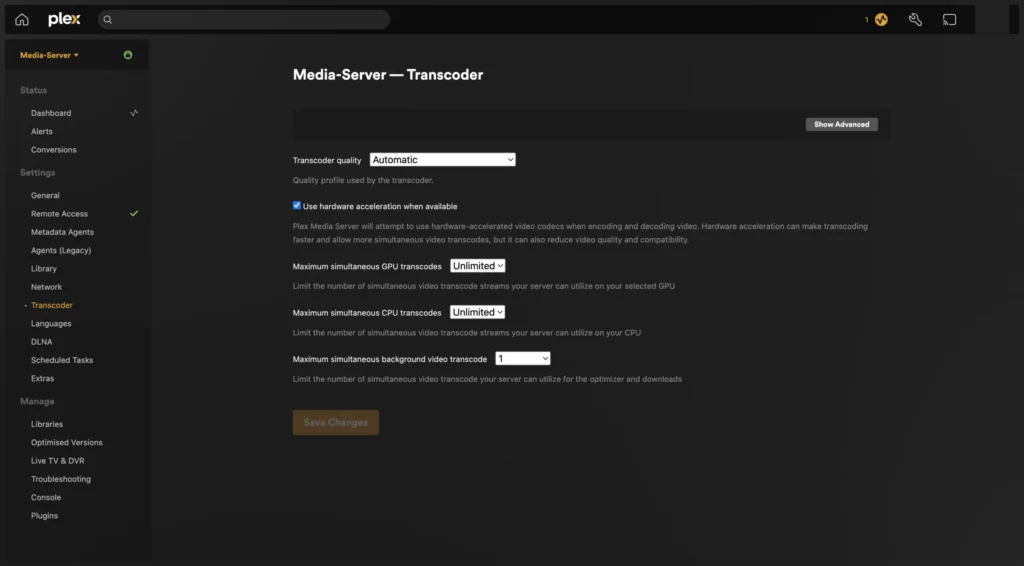
Go to Settings → Transcoder. Enable Use hardware acceleration when available. If your NVIDIA GPU is passed through correctly, you’ll see it listed. You can verify with:
docker exec plex nvidia-smiIf that returns GPU info, hardware transcoding is working. Streams that need to be converted (wrong codec, client can’t direct play) will now use the GPU instead of the CPU.
3 — Connect Radarr and Sonarr
In Radarr: Settings → Connect → + → Plex Media Server. Enter your NAS IP and port 32400. Radarr will trigger a library refresh every time it imports a movie, so new content appears in Plex within seconds of the download finishing.
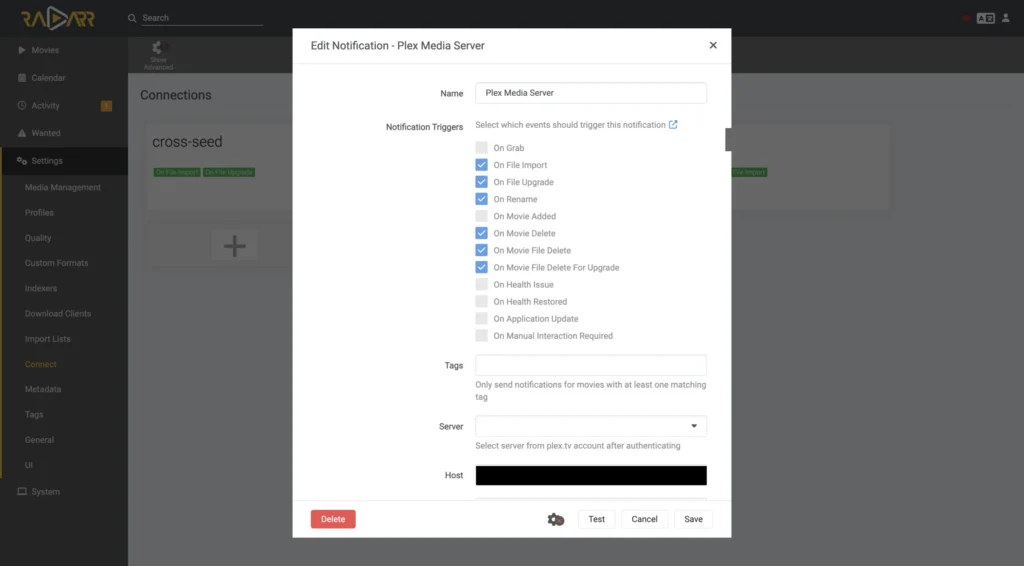
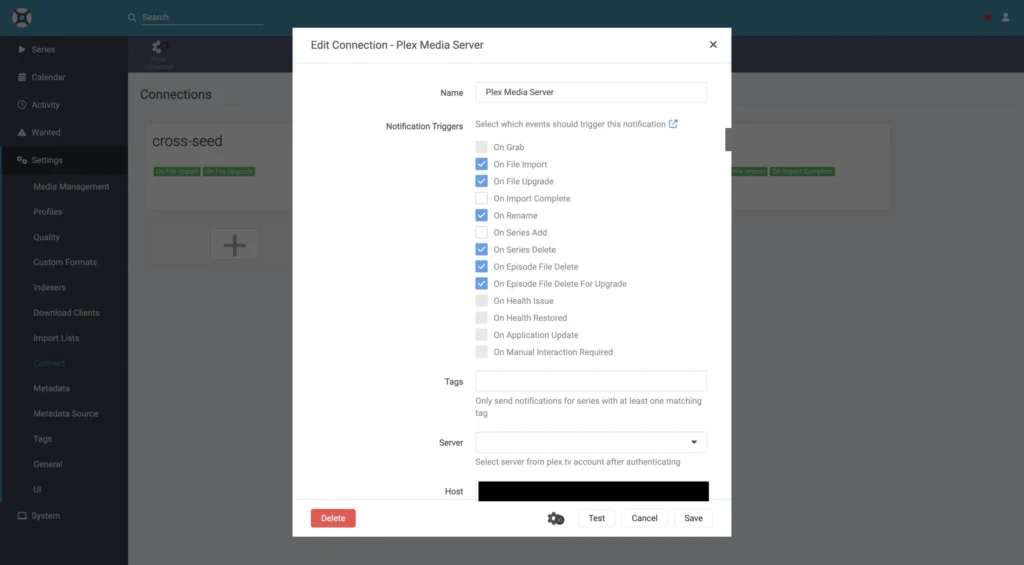
Do the same in Sonarr for TV shows.
4 — Set your transcoder temp path
Go to Settings → Transcoder → Transcoder temporary directory and set it to /transcode. This maps to /tmp/plex-transcode on the host — using a temp path keeps transcode files off your config dataset and avoids unnecessary ZFS writes.
How library scanning works
- Radarr / Sonarr finish an import and call Plex’s webhook
- Plex scans the specific folder (not the whole library) for new files
- It matches the filename against TMDB or TheTVDB to identify the title
- Metadata, artwork, and subtitles are fetched and cached in
/config - The item appears in your library, ready to stream
The whole process usually takes under 10 seconds from import to appearing in Plex.
Useful commands
# Stream live logs
docker compose logs -f plex

# Restart after a config change
docker compose restart plex

# Check GPU is visible inside the container
docker exec plex nvidia-smi

# Force a full library scan (useful after moving files)
docker exec plex bash -c 'curl -s "http://localhost:32400/library/sections/all/refresh?X-Plex-Token=YOUR_TOKEN"'
Common problems
| Problem | Likely cause |
|---|---|
| Can’t reach :32400 from the browser | Firewall blocking the port, or container not started with host networking |
| New files not appearing in library | Radarr/Sonarr connection not configured, or path inside Plex doesn’t match where files landed |
| Buffering / slow streams | Client can’t direct play — check transcoder is using GPU not CPU |
| Hardware transcoding not available | NVIDIA env vars missing, or nvidia-container-runtime not installed on the host |
| Permission denied on /media | PUID/PGID not matching dataset ownership — should be 568:568 |
| Metadata wrong or missing | Filename not matching expected format — Radarr/Sonarr handle renaming so this is usually fine |