
For educational purposes only. This guide shows how to install self-hosted software on your own hardware. I don't condone piracy: only use these apps with media you own or have the right to use, and follow the law where you live. Back up your data first. Full disclaimer
Updated 16 November 2026
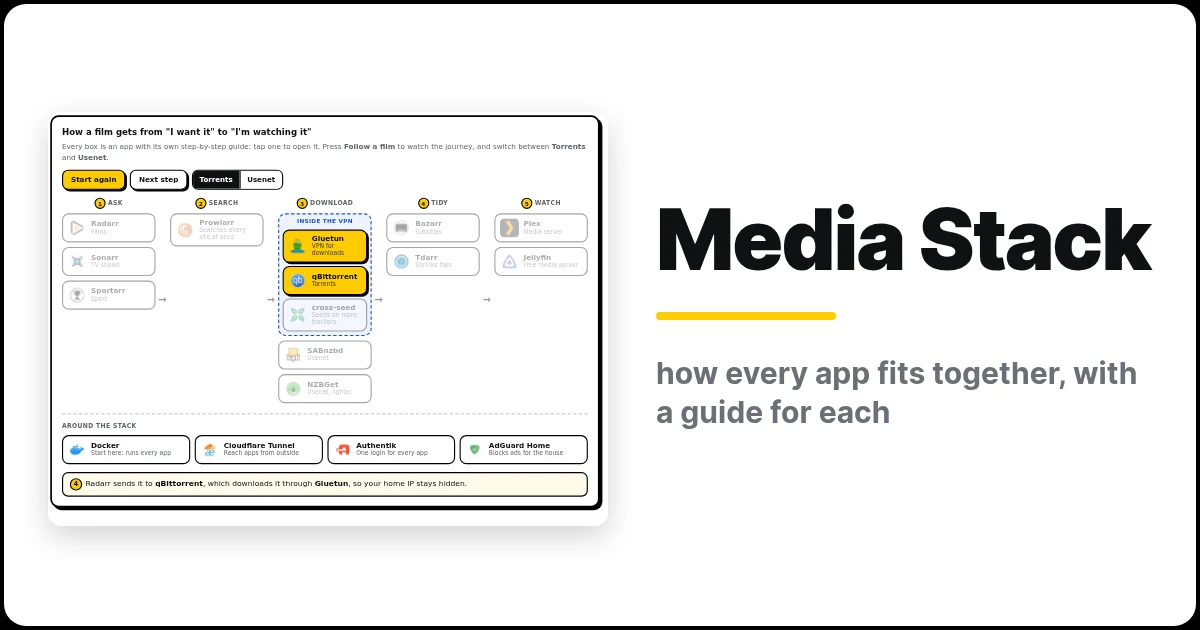
A home media server isn’t one app. It’s a small team of apps, each doing one job: one finds films, one downloads them, one adds subtitles, one plays them on your TV. This page shows how the whole media server stack fits together, with a link to my step-by-step guide for every app. Then you can design your own server and get one compose file for all of it.
On this page (6 sections)
The media server stack at a glance
Tap any app to open its guide. Press Follow a film to watch one film’s journey from “I want it” to “I’m watching it”, and switch between Torrents and Usenet to see both routes.
Design your own server
Now build yours. Tap the apps you want and the builder writes one compose.yaml for all of them. Start with Plex, add Radarr, add Sonarr; change your mind and swap Plex for Jellyfin. The What else you need box checks your picks and offers one-tap fixes, so everything works the first time you start it: for example, it adds a download client and Prowlarr for Radarr, and puts qBittorrent behind a VPN.
When it’s ready: save compose.yaml and .env in a new folder, fill in the empty values in .env, run the commands on the Folders tab, then use the Connect the apps tab to tell the apps about each other. Each app’s own guide (in the table below) walks through its settings screen by screen.
Every app and what it does
| App | What it does | Web page |
|---|---|---|
| Radarr | Finds and organises films | :7878 |
| Sonarr | Finds and organises TV shows | :8989 |
| Lidarr | Finds and organises music | :8686 |
| Prowlarr | Searches all your indexers at once, and syncs them to every app | :9696 |
| Profilarr | Sets up quality profiles in Radarr and Sonarr for you | :6868 |
| Gluetun | VPN that hides your home IP while downloading | none |
| qBittorrent | Downloads torrents | :8080 |
| Transmission | Downloads torrents, lighter and simpler than qBittorrent | :9091 |
| SABnzbd | Downloads from Usenet | :8080 (:8085 behind Gluetun) |
| NZBGet | Downloads from Usenet, lighter on memory | :6789 |
| Bazarr | Adds subtitles | :6767 |
| Tdarr | Shrinks files to H.265 | :8265 |
| Cleanuparr | Clears stuck downloads and fake releases | :11011 |
| Unpackerr | Unpacks RAR downloads so Radarr and Sonarr can import them | :5656 |
| Cantinarr | Lets your household request films and TV from their own app | :8585 |
| ClamAV | Scans downloads for viruses and moves anything infected out of the way | :3310 |
| Gotify | Sends alerts from your apps (downloads, viruses, health checks) to your phone | :8680 |
| Plex | Plays everything on your TV, phone and tablet | :32400/web |
| Jellyfin | Free, open-source alternative to Plex | :8096 |
| Emby | Another alternative to Plex (GPU transcoding needs Emby Premiere) | :8096 |
| Cloudflare Tunnel | Lets you reach your apps from outside, with no open ports | none |
| Authentik | One login in front of every app | :9000 |
| AdGuard Home | Blocks ads for every device in the house | :3000 (setup) |
Open each one at http://YOUR-SERVER-IP:PORT.
Where to start
You don’t need everything on day one. Set it up in this order, and each guide links to the next:
- Docker. Every app runs in it. Install Docker, then try your first app.
- A download client. Torrents: Gluetun first, then qBittorrent. Usenet: SABnzbd or NZBGet. Or both.
- Prowlarr, to search your indexers.
- Radarr and Sonarr, to find and organise everything.
- Plex, Jellyfin or Emby, to watch it.
- Extras once it all works: Bazarr, Tdarr, Cleanuparr, Unpackerr, Cantinarr, ClamAV, Lidarr.
- Away from home: Cloudflare Tunnel plus Authentik.
/data, with /data/torrents, /data/usenet and /data/media inside). Then Radarr and Sonarr can hardlink finished downloads into your library instantly, with no copying and no extra space. Every generator on this site uses this layout.Want a full walkthrough?
My Complete Arr Stack guide takes the core apps from an empty server to a first download, step by step, with or without a VPN. It also explains splitting the stack into separate compose files.
Related guides: Install Docker · Complete Arr Stack · Gluetun · TrueNAS Storage · My Home Server Build
If this guide helped you, consider buying me a coffee. It helps keep guides like this one coming.
Frequently asked questions
What apps make up a media server stack?
A request app, Radarr for films and Sonarr for TV, Prowlarr for indexers, a download client such as qBittorrent or SABnzbd, Bazarr for subtitles, and a media server such as Plex or Jellyfin. Gluetun adds an optional VPN.
Where should I start?
Install Docker, then follow the order in "Where to start" on this page. Each app has its own step-by-step guide, linked above.
Can I get one compose file for the whole stack?
Yes. Use "Design your own server" on this page to pick your apps and get one Docker Compose file for all of them.
Get new guides by email
About one email a month: new step-by-step guides and card releases. No spam, unsubscribe any time.